
Viewing metadata associations
Metadata associations a data element has are listed in the Element Info view (figure 14.14).
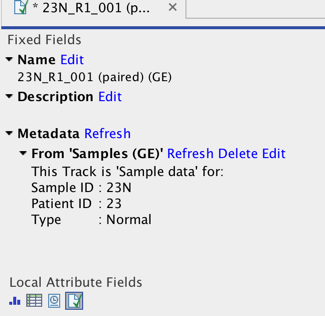
Figure 14.14: Element Info view with a metadata association
The following operations are available for each association:
- Find Locate the CLC Metadata Table that the association is with in the Navigation Area.
- Delete Remove the association.
- Edit Change the role of the metadata association.
- Refresh Reload the metadata details from the Metadata Table; this functionality may be used to attempt to re-fetch metadata that was previously unavailable, for example, due to server connectivity.
See Element Info View for general information about this view.