
Import tracks
To import data to a Track element, click the Import ( ) icon in the Toolbar and choose Tracks. This will open a dialog as shown in figure 7.2.
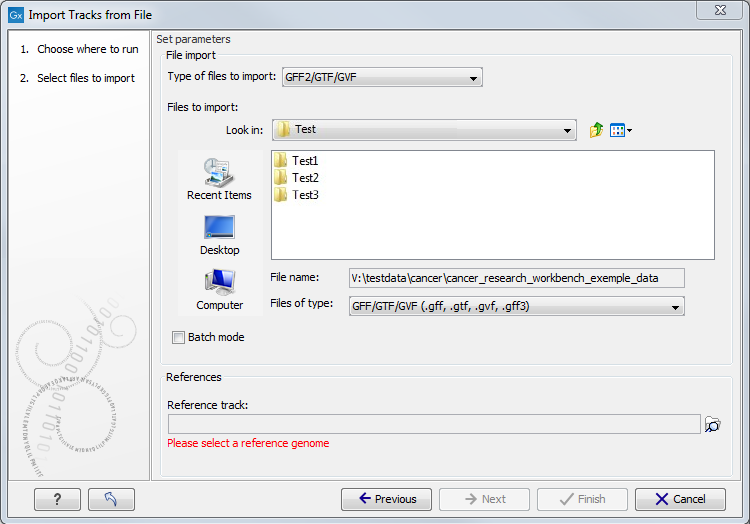
Figure 7.2: Select files to import.
In the Types of files to import drop-down menu in the dialog (figure 7.2), specify the format of the data to be imported, and then elect the files(s) to import. Zip compressed files are supported.
By default, data of the same type from all the files will be imported to the same track element. Check the Batch mode checkbox to process each file independently, such that separate tracks are created for the data imported from each file. Whether or not this checkbox is checked, data of different types, and VCF files with genotype information, will be put into separate tracks.
Except when importing FASTA format data, a sequence track containing the relevant reference sequences must be supplied in the Reference track field. Positional coordinates in the file being imported must be compatible with those in the reference track. Chromosome names must also match, but certain synonyms are recognized. See Annotation and variant formats for details.
Data in the following formats can be imported to tracks:
- FASTA
- Import sequences to a sequence track. This is primarily of use when importing reference sequences. To import sequencing reads, see Import NGS Reads. To convert an existing sequence list to a track, see Converting data to tracks and back.
- GFF2/GTF/GVF
- Files in these formats contain
various types of annotations. A GVF file is similar to a GFF file but uses
Sequence Ontology to describe genome variation data.
The annotation information from each line in the file is added to the track using the genomic coordinates specified in that line.
For annotations of type CDS, exon, mRNA, transcript and gene, the following special handling applies:
- A gene annotation is generated for each gene_id. The region annotated extends from the leftmost to the rightmost positions of all annotations that have the gene_id (gtf-style).
- CDS annotations that have the same transcriptID are joined to one CDS annotation (gtf-style). Similarly, CDS annotations that have the same parent are joined to one CDS annotation (gff-style).
- If there is more than one exon annotation with the same transcriptID these are joined to one mRNA annotation. If there is only one exon annotation with a particular transcriptID, and no CDS with this transcriptID, a transcript annotation is added instead of the exon annotation (gtf-style).
- Exon annotations that have the same parent mRNA are joined to one mRNA annotation. Similarly, exon annotations that have the same parent transcript, are joined to one transcript annotation (gff-style).
- GFF3
- A GFF3 file contains a list of various types of annotations that
can be linked together with "Parent" and "ID" tags. Learn more about how the
CLC Genomics Workbench handles GFF3 format in GFF3 format.
- VCF
- This is the file format used for variants by the 1000 Genomes
Project and it has become a standard format. Read about VCF format here https://samtools.github.io/hts-specs/VCFv4.2.pdf. Learn how to access data at
https://www.internationalgenome.org/data/#DataAccess. Learn more about how the
CLC Genomics Workbench handles VCF format in VCF format.
- BED
- This format is typically used for simple annotations, such as target regions for sequence capture methods.
The format is described at https://genome.ucsc.edu/FAQ/FAQformat.html#format1.
The 3 required BED fields (chrom, chromStart and chromEnd) must be present as the first 3 columns in the file to be imported.
Optional BED fields, present in the order stipulated in the UCSC format, are also imported, with the exceptions listed below.
If there are additional columns, these are imported and assigned the header "Var" followed by a number, e.g. Var1, Var2, etc.
Exceptions:
- The itemRgb field is ignored.
- The thickStart and thickEnd fields are used to check if the annotation is valid, but are otherwise ignored.
- Wiggle
- The Wiggle format as defined by UCSC
(https://genome.ucsc.edu/goldenPath/help/wiggle.html) is used to
hold continuous data like conservation scores, GC content etc. When imported
into the CLC Genomics Workbench, a graph track is created. An example of a popular
Wiggle file is the conservation scores from UCSC which can be download for
human from
https://hgdownload.gi.ucsc.edu/goldenPath/hg19/phastCons46way/.
- UCSC variant database table dump
- Table dumps of variant
annotations from the UCSC can be imported using this option. Mainly files
ending with
.txt.gzon this list can be used: https://hgdownload.gi.ucsc.edu/goldenPath/hg19/database/. Please note that importer is for variant data and is not a general importer for all annotation types. This is mainly intended to allow you to import the popular Common SNPs variant set from UCSC. The file can be downloaded from the UCSC web site here: https://hgdownload.gi.ucsc.edu/goldenPath/hg19/database/snp138Common.txt.gz. Other sets of variant annotation can also be downloaded in this format using the UCSC Table Browser. - COSMIC variation database
- This lets you import the COSMIC database, which is a well-known publicly available primary
database on somatic mutations in human cancer. The file can be downloaded from the COSMIC web site here:
https://cancer.sanger.ac.uk/cancergenome/projects/cosmic/download,
You must first register to download the database. The following tsv format COSMIC files can be imported using the option COSMIC variation database under Import->Tracks:
- COSMIC Targeted Screens Mutants:
- Cosmic_CompleteTargetedScreensMutant_vXXX_GRCh37.tsv
- Cosmic_CompleteTargetedScreensMutant_vXXX_GRCh38.tsv
- COSMIC Genome Screen Mutants:
- Cosmic_GenomeScreensMutant_vXXX_GRCh37.tsv
- Cosmic_GenomeScreensMutant_vXXX_GRCh38.tsv
- COSMIC Census Genes Mutations
- Cosmic_MutantCensus_vXXX_GRCh37.tsv
- Cosmic_MutantCensus_vXXX_GRCh38.tsv
- COSMIC Resistance Mutations:
- Cosmic_ResistanceMutations_vXXX_GRCh37.tsv
- Cosmic_ResistanceMutations_vXXX_GRCh38.tsv
Variants in recent COSMIC tsv format files are 3'-shifted relative to the plus-strand of the reference. To compare variants detected using the CLC Genomics Workbench with COSMIC variants, it may be preferable to import COSMIC VCF files with variants 5'-shifted using the VCF importer. This is because variants detected using the CLC Genomics Workbench, in accordance with VCF recommendations. (See Gap placement.)
- COSMIC Targeted Screens Mutants:
Subsections