
References and masking
When the sequences are selected, click Next, and you will see the dialog shown in figure 31.2.
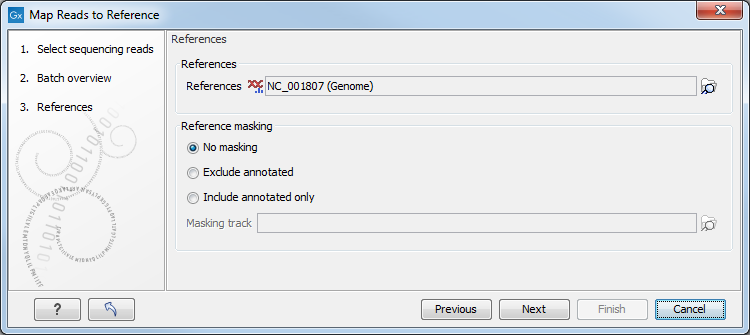
Figure 31.2: Specifying the reference sequences and masking.
At the top, select one or more reference sequences by clicking the
Browse ( ) button. You can
select either single sequences, a list of sequences or a sequence
track as reference.
Note the following constraints:
) button. You can
select either single sequences, a list of sequences or a sequence
track as reference.
Note the following constraints:
- single reference sequences longer than 2gb (
 bases) are not supported.
- a maximum of 120 input items (sequence lists or sequence elements) can be used as input to a single read mapping run.
Reference masking
The next part of the dialog lets you mask the reference. Masking means that selected regions of the reference are ignored during read mapping. Reads will not be mapped to these regions, but the full reference is still included in the output.
Masking can be useful when reads are expected to originate only from specific regions, for example when working with targeted sequencing data. However, masking should be used with care. If reads originate outside the selected regions, they may be mapped to less suitable locations, which can affect downstream analyses such as variant detection.
Masking large numbers of regions, such as repetitive sequences, is generally not recommended. Repeats are handled automatically during mapping, and masking them may reduce performance and lead to incorrect read placement.
To mask a reference using regions defined in a masking track, choose:
- Include annotated only to map reads only to those regions.
- Exclude annotated to ignore those regions.
) button to select a track for masking.
If your regions are stored as sequence annotations, they can be converted to a track.