
View alignments
Alignments have four available views:
- Alignment (
 ). The primary, graphical view of an alignment. Functionality specific to this view is described in Edit alignments. Side Panel options for adjusting what is displayed in the Alignment view and how to display it, are described below.
- Primer Designer (
 ). (Nucleotide alignments only) Used to design PCR primers and TaqMan probes. Further details are in Alignment-based primer and probe design.
- Annotation Table (
 ). A table containing a row for each annotation on the sequences in the alignment. Further details are in View Annotations in a table.
- Table (
 ). A table containing a row for each sequence in an alignment. Further details are in Table view of alignments.
Side Panel settings in the Alignment view
Options in the Side Panel allow for detailed customization of the view. Each of the palettes available in the Alignment view are listed below, with the information provided focused on functionality specific for alignments.
For general information about working with Side Panel settings, see Side Panel. For information about Side Panel settings shared by data types containing sequence data, see Sequence view.
Sequence layout
The Sequence layout Side Panel palette in the Alignment view includes the following options:
- Align labels. Whether to align the sequence names to the left or right within the sequence label area on the left-hand side of the Alignment view.
- Show selection boxes. Display checkboxes to the right of sequence labels. These are used for marking sequence. By default, these checkboxes are not displayed.
- Align labels. Left or right justify the sequence labels. Usually, the label is the sequence name.
- Sequence label The label used for the sequences in the view can be adjusted here. In addition to the options provided for inidividual sequence elements, the following options are available when working with an alignment:
- Name (number). The sequence name followed by a sequential number representing the position of each sequence in the alignment. The numbers are updated each time the order of the sequences is changed.
- (number) Name. The sequence name prepended by a sequential number representing the position of each sequence in the alignment. The numbers are updated each time the order of the sequences is changed.
- Matching residues as dots. When checked, the residues in each position are compared to the residue at that position in the top sequence of the alignment. Those that match are represented by dots.
- Alignment on top. When checked, the aligned sequences are shown above other items in the alignment view such as a consensus sequence, conversation graph, etc. When unchecked, the sequences are displayed below other items.
Residue coloring
The Residue coloring Side Panel palette contains one option specific to alignments, Color gaps. The available choices are:
- Foreground color. Sets the color of the gap symbol (dashes). Click the color box to change the color.
- Background color. Sets the background color of the gaps. Click the color box to change the color.
For details about adjusting the colors in each gradient, see Side Panel.
Alignment info
The Alignment info Side Panel palette provides options for displaying summary information about the alignment.
Consensus
To include a consensus sequence in the Alignment view, check the Show option just under the "Consensus" heading. The consensus sequence containing the most common residue for each position across the alignment.
When the Show option is checked, the following options are displayed:
- Limit. Specify how conserved a position in the alignment must be for a residue to be assigned to that position in the consensus sequence. When this level is not met, the ambiguity character selected in the Ambigous symbol drop-down list is included in the consensus.
For nucleotide alignments, an option called "IUPAC" is offered. When selected, the relevant ambiguity code is displayed when there are differences between the sequences.
- No gaps. When unchecked, the consensus sequence will contain a gap symbol at positions where there were enough gaps in the sequences to meet the specified Limit. When checked, gap symbols will not be used in the consensus. Instead a residue or ambiguity code will be put in each position, using the Limit setting to determine which symbol to use.
This option is not available for nucleotide alignments where "IUPAC" has been selected as the Limit type.
Conservation
This section contains settings for indicating the level of conservation at each position in the alignment.
- Foreground color. When checked, the sequence symbols are colored according to the level of conservation at that position.
- Background color. When checked, the background of each position is colored according to the level of conservation at that position.
For details about adjusting the colors used, see Side Panel.
- Graph. When checked, the level of conservation at each position is displayed in a separate item in the Alignment view labeled "Conservation".
When this option is selected, the following can be configured:
- The vertical display space to use for the conservation information. Select from the options in the Height drop-down list.
- How to represent the conservation: Bar plot is the default, with Line plot and Colors also available. The latter changes the graph to a color bar using a gradient to visualize conservation level.
- The graph color for Line and Bar plots, or the color gradient to use for the Colors option. For details about adjusting the colors used, see Side Panel.
Note that no matter which representation is chosen, hovering the mouse cursor over a position will result in a tooltip containing the level of conservation at that position. In addition, data points for the graph can be exported to a file.
Gap fraction
This section contains settings for indicating the fraction of the sequences that have gaps at each position.
- Foreground color. When checked, the sequence symbols are colored according to the relative number of gaps at each position.
- Background color. When checked, the background of each position is colored according to the relative number of gaps at that position.
For details about adjusting the colors used, see Side Panel.
- Graph. When checked, the relative number of gaps at each position is displayed in a separate item in the Alignment view labeled "Gap fraction".
When this option is selected, the following can be configured:
- The vertical display space to use for the gap fraction information. Select from the options in the Height drop-down list.
- How to represent the conservation: Line plot is the default, with Bar plot and Colors also available. The latter changes the graph to a color bar using a gradient to visualize gap fractions.
- The graph color for Line and Bar plots, or the color gradient to use for the Colors option. For details about adjusting the colors used, see Side Panel.
Note that no matter which representation is chosen, hovering the mouse cursor over a position will result in a tooltip containing the level of gap fraction at that position. In addition, data points for the graph can be exported to a file.
Color different residues
The options in this section allows residues to be colored based on whether they are different to the residue that makes up the majority in that position.
- Foreground color. When checked, the sequence symbols are colored.
- Background color. When checked, the background of each position is colored.
Sequence logo
Options in this section support adjusting the display according to information content.
When the Logo option is selected, a sequence logo, described below, is added in a separate item in the Alignment view, and the following options are displayed in the Side Panel:
- Height.Select the vertical display space to use for the logo.
- Colors. The color scheme to use for the logo. For all alignments, the options Black and Rasmol are available. For peptide alignments, a Polarity color scheme is also available, where hydrophobic residues are shown in black, hydrophilic residues in green, acidic residues in red, and basic residues in blue.
A logo displays the frequencies of residues at each position using relative heights of letters, along with the degree of sequence conservation as the total height of a stack of letters. The vertical scale measure is in bits, with a maximum of 2 bits for nucleotides and approximately 4.32 bits for amino acid residues. For more details, see Bioinformatics explained: Sequence logo.
Foreground color and Background color options are also available in this section. These are similar to those described for other Alignment info options above. When either is selected, the residue symbols or the background of the symbols, respectively, are colored according to the information content of the alignment column.
Nucleotide info
Present in the Side Panel of nucleotide alignments only.In addition to the Nucleotide info Side Panel settings for sequences, when the "Translation" option is checked, a checkbox called Relative to top sequence will be displayed. Checking this makes the reading frames for the translation align with the top sequence so that you can compare the effect of nucleotide differences on the protein level.
Protein info
Present in the Side Panel of peptide alignments only.The hydrophobicity scales available in the Protein info palette for peptide sequences are available here.
Positional stats
The Side Panel palette Positional stats provides site-specific information about the alignment. Hover the mouse cursor over a position in the alignment or make a selection to populate the tab with information (figure 25.8).
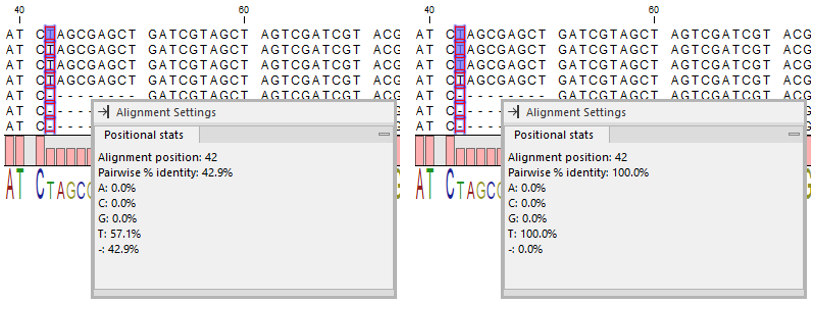
Figure 25.8: Contents of the "Positional stats" palette when a single position is selected across all sequences (Left) and when a single position is selected across three sequences (Right). Note that the palette can be dragged into the Alignment view.
The following information is provided:
- Alignment position. The selected position in the alignment. Visible if hovering over the alignment without any selection or if a single position is selected across all sequences (see difference between (Left) and (Right) in figure 25.8).
- Selected symbols. The number of residues included across all selected positions and sequences.
- Selected sequences. The number of selected sequences.
- Lengths. Min., Max., and Avg. length statistics of the selected sequences.
- Pairwise % identity. Average percent identity. All pairs of residues at the same position are compared. The number of identical pairs is counted and divided by the total number of pairs. The count of ambiguity characters is scaled to the number of residues they can represent, for example a G compared to an R (A or G) is given the value 0.5.
- Example calculation for an alignment with the nucleotides A, A, and G in the tested position: There are three pairwise comparisons, A to A = 1, A to G = 0, and A to G = 0. The pairwise % identity is then 33.3.
- Residue symbol table. Statistics on residues in a tabular format.
- Symbol. List of the four nucleotide symbols or the 20 amino acid symbols, plus the gap symbol (dash).
- %. Percentage of the residue symbols at the selected position(s).
- Count. Number of the residue symbols at the selected position(s).
Subsections