
Trim output
In the "Result handling" wizard step (figure 29.15), standard result handling options are presented, along with output options specific to this tool.
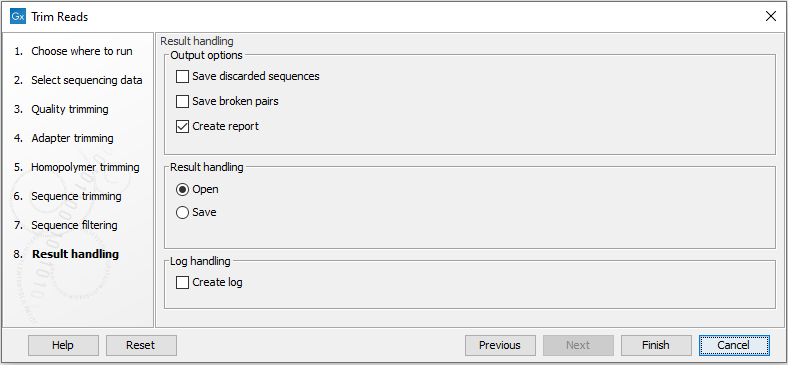
Figure 29.15: Specifying the trim output.
Outputs containing trimmed reads are always generated. If multiple sequence lists were provided as input, a corresponding number of sequence lists containing trimmed reads is produced. For paired reads, only intact pairs are saved in these sequence lists. Trimmed output of individual sequence elements provided as input are returned in a single sequence list.
Other outputs can optionally be generated by selecting the relevant option:
- Save discarded sequences. Create a sequence list containing reads that were discarded during trimming.
- Save broken pairs. (Relevant when trimming paired reads.) Create a sequence list containing orphan reads, i.e. reads retained after trimming but where their partner was discarded.
- Create report. Create a report summarizing the trimming carried out (figure 29.16).
The Trim Reads report
The Trim Reads report includes the following:
- Trim summary.
- Name. The name of the sequence list used as input.
- Number of reads. Number of reads in the input file.
- Avg. length. Average length of the reads in the input file.
- Trimmed sequences. The number of reads after trimming, not including orphan reads.
- Trimmed (broken pairs). The number of broken pairs after trimming (orphan reads).
- Total number of reads after trim. The total number of reads retained after trimming. This includes both paired and orphan reads.
- Percentage trimmed. The percentage of the input reads that are retained.
- Avg. length after trim. The average length of the retained sequences.
- Read length before / after trimming. This is a graph showing the number of reads of various lengths. The numbers before and after are overlayed so that you can easily see how the trimming has affected the read lengths (right-click the graph to open it in a new view).
- Trim settings A summary of the settings used for trimming.
- Detailed trim results. A table with one row for each type of trimming:
- Input reads. The number of reads used as input. Since the trimming is done sequentially, the number of retained reads from the first type of trim is also the number of input reads for the next type of trimming.
- No trim. The number of reads that have been retained, unaffected by the trimming.
- Trimmed. The number of reads that have been partly trimmed. This number plus the number from No trim is the total number of retained reads.
- Nothing left or discarded. The number of reads that have been discarded either because the full read was trimmed off or because they did not pass the length trim (e.g. too short) or adapter trim (e.g. if Discard when not found was chosen for the adapter trimming).
- Automatic adapter read-through trimming. This section contains statistics about how many reads were automatically trimmed for adapter read-through. It will also list the two detected read-through sequences for each analyzed sequence list.
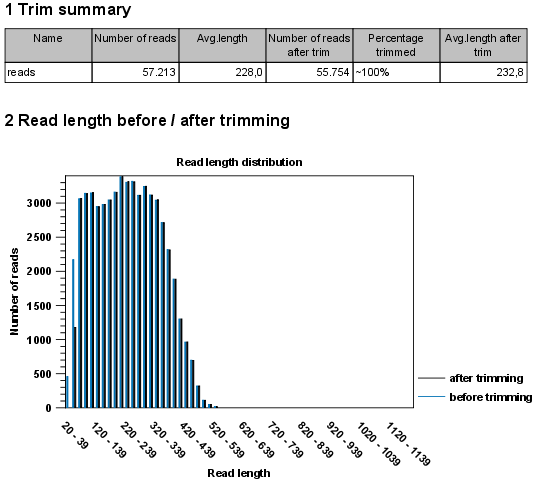
Figure 29.16: A report with statistics on the trim results. Note that the Average length after trimming (232,8bp) is bigger than before trimming (228bp) because 2.000 very short reads were discarded in the trimming process.
When placed in a workflow and connected to another downstream tool or output element, the Trim Reads tool will always generate all outputs (including the report), leading to the following situations:
- When no reads have been trimmed (either because all trimming options were deselected, or because none of the trim options matched any of the reads), the "Trimmed sequences" output will contain all input reads, "Discarded sequences" will be empty, and "Percentage trimmed" will be 100% in the report.
- When all reads have been trimmed, the "Discarded sequences" output will contain all input reads, "Trimmed sequences" will be empty, and "Percentage trimmed" will be 0%.