
Working with sequence lists
This section covers working with Sequence Lists, which are elements that contain one or more nucleotide sequences or one or more protein sequences. Functionality for working with individual sequences is also available when working with sequences in the context of a list. Individual sequences can also be opened in a linked view with the list using the Open Sequence in the right-click menu.
Note: Nucleotide sequence lists can contain single end sequences or paired end sequences. Handling paired data is described later in this chapter.
Like other data elements, working interactively with Sequence Lists benefits from:
- Opening different views of the data Icons for the available views are at the bottom of the viewing area. Clicking one of these icons opens a particular view. Opening multiple linked views can make working with the data easier and more efficient. For Sequence Lists, the graphical view and Table view are particularly useful to open as linked views (figure 16.7).
- Adjusting view settings in the Side Panel For each view, settings are available in the Side Panel to customize what is displayed and how it is displayed. These Side Panel settings can be saved for re-use.
- Taking advantage of functionality offered in context menus Right-clicking on a particular area in a view often results in a context menu opening with options relevant to the location clicked on.
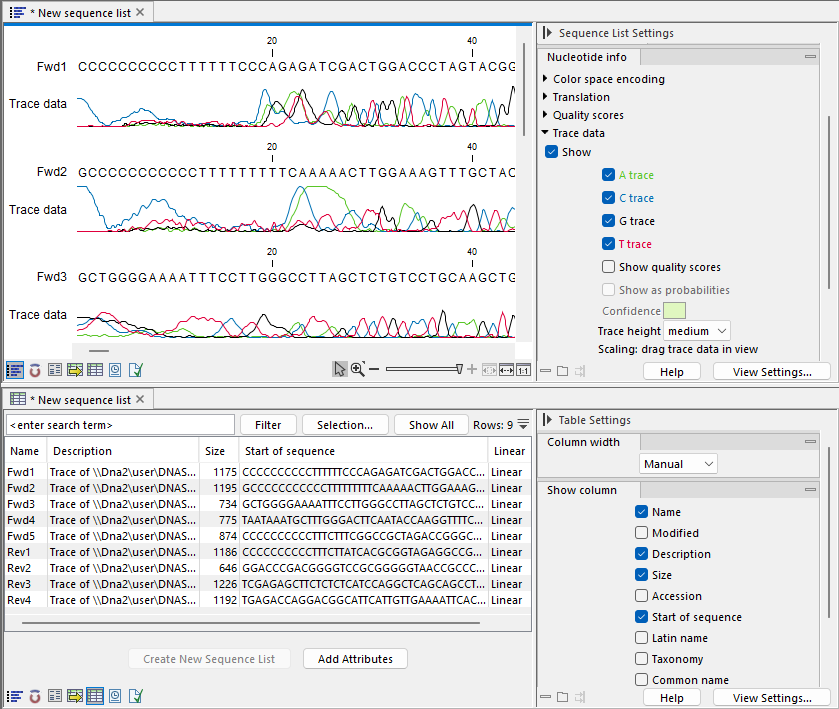
Figure 16.7: Linked views of a Sequence List. The graphical view (top) has traces displayed, while the tabular view has a subset of the available columns selected for display.
Subsections
- Creating sequence lists
- Sequence List view
- Table view of sequence lists
- Annotation Table view of sequence lists
- Working with paired sequences in lists