
Annotate with Known Variants
Annotate with Known Variants takes as input a variant track ( ) and outputs variants annotated with information from matches in a known variants track (). An input variant can have one of the following match types with a known variant:
- Exact The region, type, allele, and reference are identical.
- Partial MNV The input variant type is SNV or MNV, the known variant type is MNV, and the allele sequence of the input variant is contained within the allele sequence of the known variant.
- Overlap The regions are overlapping.
To run the tool, go to:
Tools | Resequencing Analysis ( ) | Variant Annotation (
 ) | Annotate with Known Variants (
 )
The following options can be configured (figure 33.5):
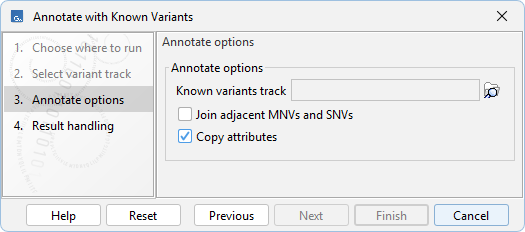
Figure 33.5: The available options in Annotate with Known Variants.
- Known variants track One or more variant tracks () containing the known variants to annotate with.
- Join adjacent MNVs and SNVs When checked, adjacent MNVs and SNVs in the track of known variants are matched as if they were one continuous MNV. This is useful because many databases do not report a succession of SNVs as one MNV. Note that this assumes SNVs and MNVs in the track of known variants represent the same allele, although there is no evidence for this.
- Copy attributes When checked, original attribute values from known variants with exact matches are included in the output.
Attributes ending in "(known variant)" are added to the output for each match type, containing the names of the known variant tracks where a match of that type was found (figure 33.6).
Additionally, when Copy attributes is checked, the attributes of known variants with exact matches are added to the output, with "(known variant)" appended to their name (figure 33.6). If a variant matches multiple known variants, their values are separated by commas. For example, if two known variants with exact matches have "Count" values of 2 and 3, the output will have a "Count (known variant)" value of "2, 3".
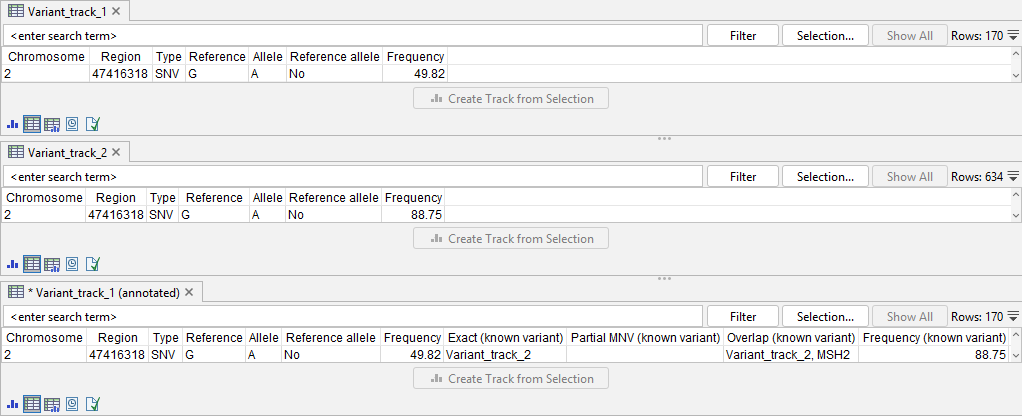
Figure 33.6: A split view displaying the table view of two variant tracks at the top and the result of annotating Variant_track_1 with Variant_track_2 using Annotate with Known Variants at the bottom.