
Create Pairwise Comparison
Create Pairwise Comparison takes as input an alignment ( ) and compares each pair of sequences, providing an overview of the diversity among the sequences. The output is a pairwise comparison element (
 ).
To run the tool, go to:
Tools | Classical Sequence Analysis ( ) | Alignments and Trees (
 ) | Create Pairwise Comparison ()
A pairwise comparison can also be created for a selected part of an alignment directly from the Alignment view:
- Right-click on an alignment selection.
- Choose Create Pairwise Comparison... ().
The following comparisons are available:
- Gaps The number of alignment positions where one sequence has a gap and the other does not.
- Differences The number of alignment positions where one sequence is different from the other, including gap differences.
- Distance The Jukes-Cantor distance, calculated as the Jukes-Cantor correction of the proportion of identical to overlapping alignment positions.
- Percent identity The percentage of overlapping alignment positions that are identical.
- Identities The number of overlapping alignment positions that are identical.
For an overlapping position, at least one of the two sequences has a residue.
All comparisons are symmetric, meaning that comparing sequence A to sequence B gives the same result as comparing B to A.
The pairwise comparison element () contains two views: the pairwise comparison view and the table view (figure 25.20).
The following can be configured in the Side Panel of the pairwise comparison view:
- In the Contents palette:
- Upper/Lower comparison The comparison to show in the upper/lower triangle of the table.
- Upper/Lower comparison gradient The color gradient to use for the upper/lower triangle.
- Diagonal from upper/lower When selected, the diagonal entries are taken from the upper/lower comparison.
- No diagonal When selected, the diagonal entries are left blank.
- In the Layout palette:
- Lock headers When checked, the sequence labels and table headers remain fixed when scrolling.
- Sequence label on top/left side The attribute to use for labeling sequences on the horizontal/vertical axis.
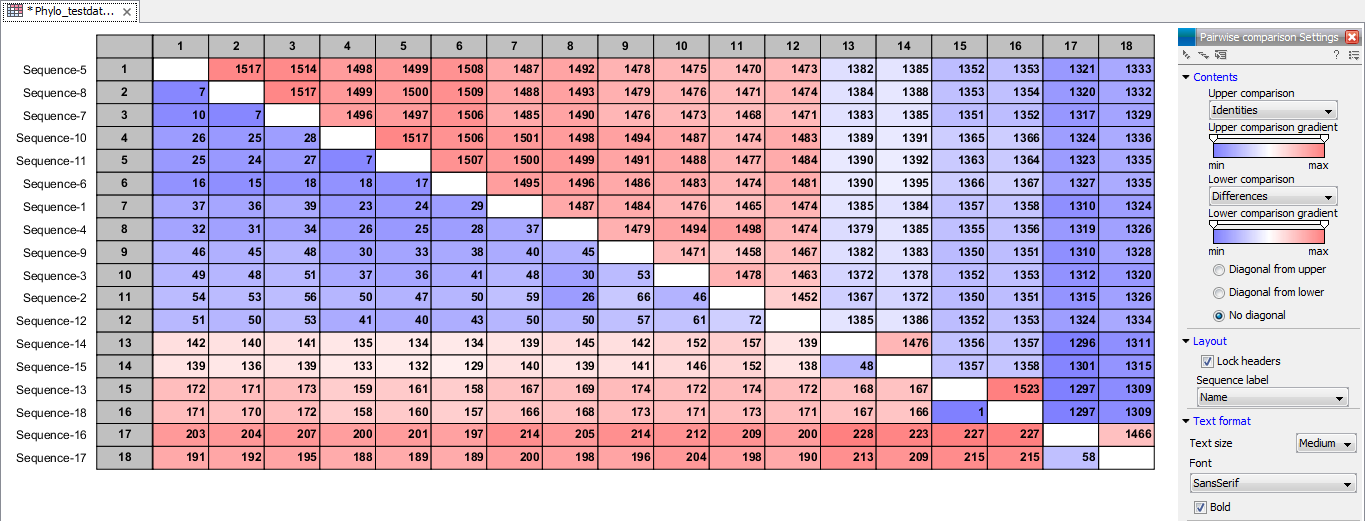
Figure 25.20: A pairwise comparison opened in split view, with the pairwise comparison view at the top and the table view at the bottom.
The table view lists the comparison results for all pairs of sequences, excluding comparisons of a sequence with itself. Since all comparisons are symmetric, each pair appears only once.