
Handling NCBI sequence search results
A list of entries matching the search terms provided is returned (figure 11.2). By default, the initial 50 results are returned, with 50 additional results loaded each time the More... button is clicked. This number can be configured in the Workbench Preferences.
The following information is shown for each entry:
- Hit The rank of the entry in the search result
- Accession The accession for that entry. Click the link to open that entry's page at the NCBI in a web browser.
- Description The definition line of the entry
- Modification date The date the entry was last updated in the database searched
- Length The length of the sequence
The columns to display can be configured in "Show column" tab of right hand, side panel settings.
Downloading results from NCBI
Results can be downloaded and imported into the CLC Genomics Workbench as a Sequence List by selecting the rows of interest and using options available at the bottom of the view or in the menu opened by right-clicking on a selected area (figure 11.2):
- Download and Open Sequences are downloaded opened in a new view after the download is complete.
You can also download and open sequences by dragging selected rows to a new tab area or by double-clicking a row.
Using this option, the Sequence List is opened, but not saved. Additional action must be taken to save these results.
This option is not generally recommended when working large sets of results or large sequences.
- Download and Save Sequences are downloaded and saved to a location you specify.
You can also download and save sequences by selecting rows and copying them (e.g. using Ctrl + C), and then selecting a folder in the Navigation Area and pasting (e.g. using Ctrl + V).
Downloading and saving large sequences or large numbers of sequences can take some time. This process runs in the background, so you can continue working on other tasks. The download process can be seen in the Status bar and can be stopped if desired.
If only a single row is selected, the entry will be downloaded and imported as a Sequence element, rather than a sequence list. Double-clicking on a single row will download and open that individual entry.
Notes:
- Using the options described above the sequence and all annotations on that sequence, for example genes, mRNAs, etc, defined in the feature table of the entries, are downloaded and imported.
- The modification date on sequences downloaded can be more recent than those reported in the results table. This depends on the database versions made available for searching at the NCBI.
Opening results at the NCBI
Selected sequences can also be opened at the NCBI by choosing Open at NCBI, available at the bottom of the view or in the menu opened by right-clicking on a selected area (figure 11.2).
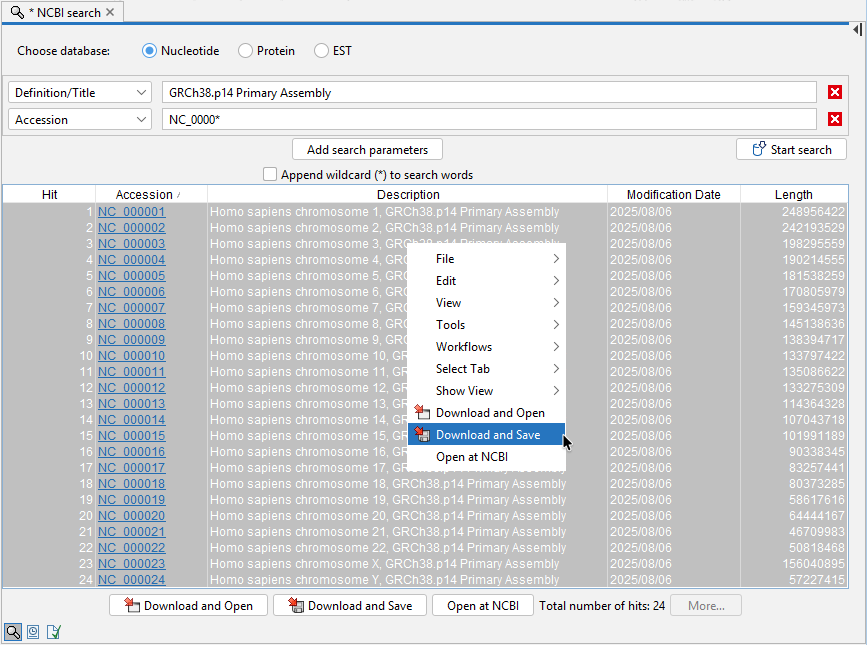
Figure 11.2: The 24 chromosomes of the hg38 human genome assembly have been selected, enabling options to download the sequences or open them at the NCBI.