
Interactive restriction sites
The Restriction sites palette (figure 24.39) in the Side Panel of sequence and sequence list views provides options for displaying restriction sites and managing restriction enzymes.
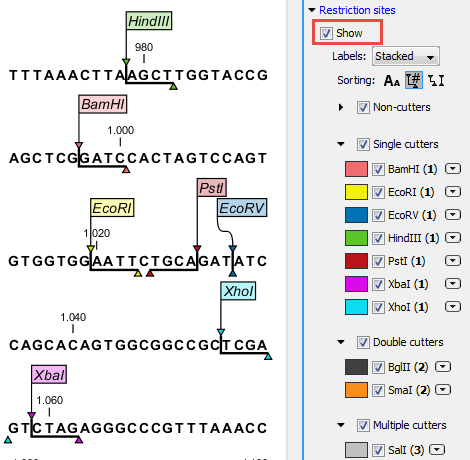
Figure 24.39: Restriction sites for several restriction enzymes.
The following options can be configured:
- Show When checked, restriction site options are shown in the palette and the sequences are searched for the recognition motifs of the selected enzymes.
- Labels Controls how the enzyme names are shown:
- No labels Enzyme names are not shown.
- Flag Enzyme names are shown as flags above the sequence. Available only in the linear view.
- Radial Enzyme names are shown as close to the cut sites as possible. Available only in the circular view.
- Stacked Enzyme names are stacked so that all labels are visible. In the circular view, labels are aligned on each side of the circle.
Note that in the circular view, any Labels setting other than No labels is also applied to the Annotation layout palette.
- No labels Enzyme names are not shown.
- Filtering Controls which enzymes are shown:
- Minimum number of cut sites When set, only enzymes that cut the sequence at least this number of times are shown.
- Maximum number of cut sites When set, only enzymes that cut the sequence at most this number of times are shown.
- Overhang types Enzymes with the following overhang types can be shown:
- Blunt Enzymes that cut both strands at the same position.
- 5' Enzymes that produce a 5' overhang.
- 3' Enzymes that produce a 3' overhang.
- Sorting The enzymes can be sorted By name or By number of cut sites.
By default, commonly used enzymes are shown. For each enzyme, the palette shows the enzyme name, its overhang type, and the number of cut sites in brackets. The following controls are available for each enzyme:
- Check the box to show the cut sites on the sequence. Hovering over a cut site shows information about the enzyme.
- Click the color indicator to change the color used for the enzyme.
- Click the right arrow icon (
 ) to navigate to the next cut site on the sequence. Hold Ctrl (
 on Mac) while clicking to navigate to the previous cut site.
- Click the down arrow icon (
 ) to display a list of all cut sites. Click a cut site in the list to navigate to its position on the sequence.
Use Select All and Deselect All to check or uncheck all enzymes in the palette.
To update the enzymes shown in the palette, click the Manage Enzymes button.
Subsections
- Manage enzymes
- Enzymes cutting inside/outside selection
- Show enzymes with compatible ends
- Insert restriction site