
Golden Gate Cloning
Golden Gate Cloning supports the design of ordered, multi-fragment constructs. In Golden Gate assembly, fragments are joined at junctions defined by compatible overhangs generated using restriction enzyme cut sites. The tool provides a dedicated interface for selecting or designing these junctions, making it particularly useful for assemblies with multiple fragments. See Restriction Based Cloning for general restriction-based cloning.
To run the tool, go to:
Tools | Molecular Biology Tools ( ) | Cloning (
 )| Restriction Analysis and Cloning (
 ) | Golden Gate Cloning (
 )
Specify the inputs
In the "Input" wizard, the following options are available (figure 24.44):
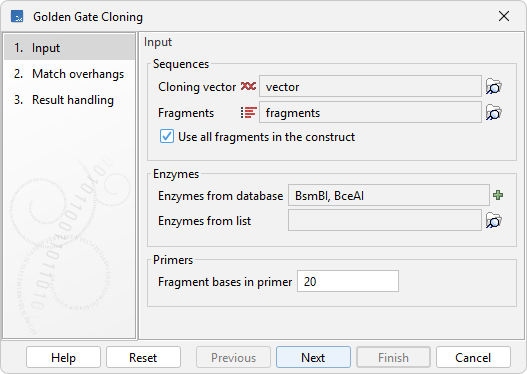
Figure 24.44: Selecting the cloning vector, fragments, and enzymes.
- Cloning vector The target vector sequence (
 ). The sequence must contain suitable recognition sites for the selected enzymes.
- Fragments One or more fragments () (
 ) to insert into the cloning vector. A fragment may already contain suitable recognition sites, or primers can be designed to introduce them.
- Use all fragments in the construct When unchecked, a subset of the fragments can be selected in the next step (figure 24.45).
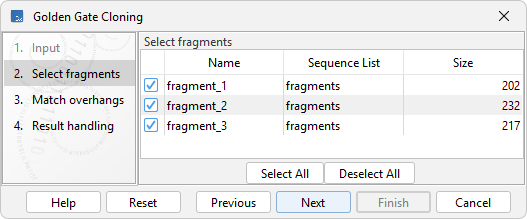
Figure 24.45: Selecting the fragments to use in the construct. - Enzymes from database Enzymes selected from the restriction enzyme database. Click the add (
 ) button to select the enzymes (see Manage enzymes) and click OK.
- Enzymes from list An enzyme list (
 ) containing the enzymes to use.
Golden Gate assembly is typically performed using one Type IIS restriction enzyme. The tool also supports multiple enzymes and restriction enzymes other than Type IIS enzymes. Selecting multiple enzymes can be useful for selecting between candidate designs.
- Fragment bases in primer The number of bases from the fragment to include in generated primers.
Match overhangs
In the "Match overhangs" wizard, the order and orientation of the fragments are defined, and compatible junctions are selected or designed (figure 24.46). The wizard contains one row for the cloning vector and one row for each fragment. Each row shows the selected start and end cuts and the corresponding overhangs. A ligase fidelity is shown when available, and validation findings are indicated when present. ( ) indicates a finding expected to prevent successful assembly, whereas (
 ) indicates a finding for which assembly is still expected to succeed.
When more than one enzyme is selected (figure 24.44), Enzymes with cut sites lists the enzymes with cut sites in the corresponding sequence for the cloning vector and each fragment (figure 24.46). Enzymes that can cause validation findings are shown in red.
The summary below the rows lists the enzymes used, the validation result, and the Total ligase fidelity.
The options at the top of the wizard can be used to automatically determine overhangs. The Copy all and Paste buttons are described in Reusing configurations.
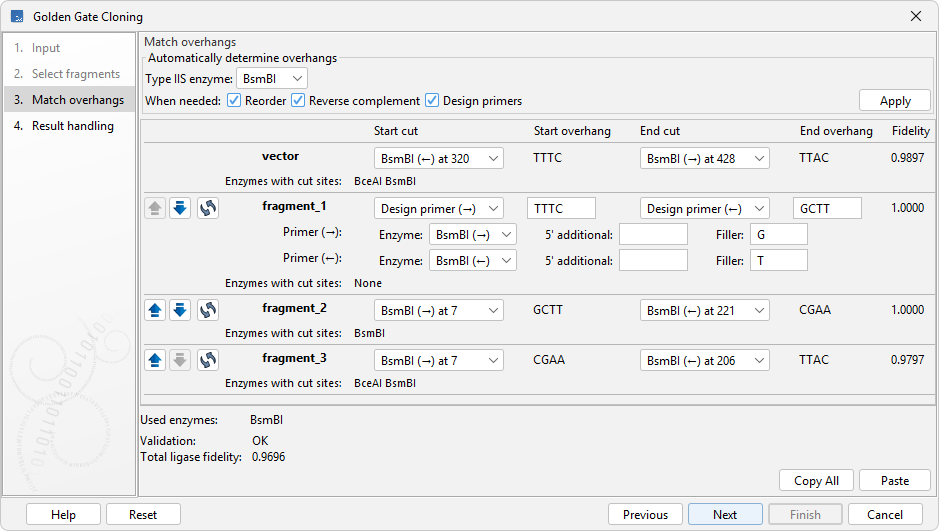
Figure 24.46: Selecting existing cut sites or designing primers to create compatible overhangs. The second and third fragments have suitable cut sites, whereas primers are required for the first fragment.
The following must be specified:
- Cloning vector The cut sites for the start and end cuts. The drop-down lists contain the available cut sites for the selected enzymes that are present in the cloning vector.
The first fragment is joined at the start cut and the last fragment is joined at the end cut.
For scarless assembly, the recognition site for the start cut must be in the reverse orientation (<-) and the end cut must be forward (->), so the recognition site is removed from the construct.
- Fragment The cut sites for the start and end cuts. The drop-down lists contain the available cut sites for the selected enzymes that are present in the fragment, as well as an option for designing a primer. Primer design is required when the fragment does not contain suitable recognition sites.
For scarless assembly, the recognition site for the start cut must be in the forward orientation (->) and the end cut must be reverse (<-), so the recognition site is removed from the construct.
The order of fragments can be changed using the (
 ) and (
 ) icons. A fragment can be reverse complemented using the (
 ) icon.
Adjacent overhangs at each junction must be compatible:
- The start overhang of the first fragment must be compatible with the start overhang of the cloning vector.
- The end overhang of the last fragment must be compatible with the end overhang of the cloning vector.
- The end overhang of each fragment must be compatible with the start overhang of the next fragment.
- An overhang should not be reused at multiple junctions. Reusing an overhang can allow fragments to ligate in an unintended order or circularize.
When designing a primer, the following options can be configured:
- Enzyme The enzyme recognition motif to add to the primer. For non-palindromic motifs, forward (->) and reverse (<-) orientations are available.
- Start overhang or End overhang The overhang at the corresponding junction. For restriction enzymes other than Type IIS enzymes, the overhang is determined by the enzyme and cannot be changed.
- 5' additional Optional nucleotides, such as tags, to add to the 5' end of the primer.
- Filler The nucleotides between the recognition motif and the cut site. The selected enzyme determines the required number of nucleotides.
Designed primers also include bases from the corresponding fragment end, as specified by Fragment bases in primer. Primer design does not support scarless cloning between fragments when primers are designed on both sides of the junction, as the designed overhang will be part of the construct.
Choose outputs
In the "Result handling" wizard, the following output options are available:
- Create sequence Creates the sequence construct () with the following annotations:
- Vector The region originating from the cloning vector.
- Insertion The region originating from an inserted fragment. One annotation is added for each fragment.
- Create primers When primers have been designed, creates a sequence list () containing one sequence for each primer. Each primer contains the following annotations:
- Restriction site The region of the enzyme recognition motif.
- Overhang The region of the overhang.
- Fragment bases The bases from the fragment, as specified by Fragment bases in primer.
- Create report Creates a report containing:
- A table summarizing the cloning design, with one row for the cloning vector and one row for each fragment. The table lists the selected sequence, start and end cuts, overhangs, and ligase fidelities, using the same row order as the "Match overhangs" wizard.
- A table with validation findings, if any. In the summary table, a sequence with a validation finding is highlighted yellow when the finding is expected to prevent successful assembly, and blue when assembly is still expected to succeed.
Subsections
- Automatically determine overhangs
- Ligase fidelity
- Keep and Cut annotations
- Reusing cloning configurations