
BLAST Graphics view
The BLAST Graphics view ( ) (top of figure 17.12) is the default view for an individual BLAST result. It can be particularly useful when opened in a split view with one of the tabular views (figure 17.12).
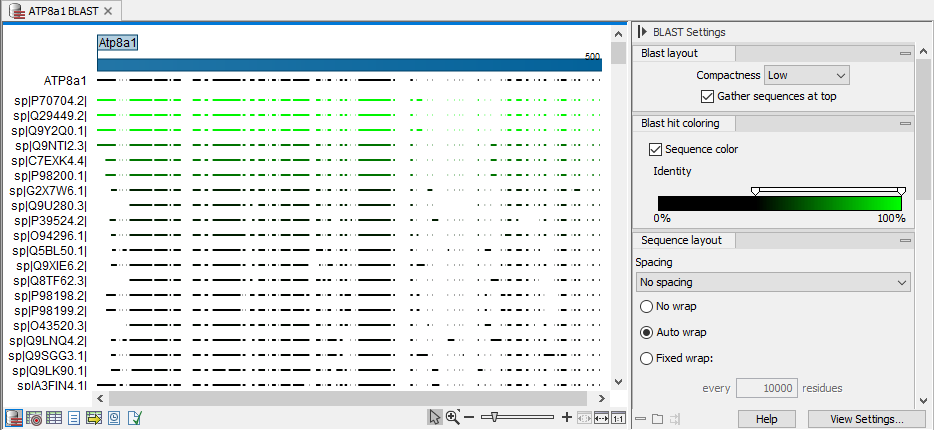
Figure 17.12: The BLAST Graphics view opened in a split view with the BLAST Hit Table. A row in the table was selected, causing the corresponding alignment in the graphical view to be selected.
A single row at the top represents the query sequence. This is followed by rows with information about each subject sequence returned by BLAST. The subject's name is reported on the left. When zoomed out, this is followed by a horizontal line representing the sequence, providing an impression of the overall match. When using "Not compact" or "Low" compactness settings (described below) and zoomed in, the residues in the sequences are visible, allowing the quality of the alignment to be considered more closely.
Hovering the mouse cursor over a name on the left reveals a tooltip with information about the subject sequence. Hovering it over the sequence area reveals details about the match with the query (further details below). The position of the mouse cursor is reported in the bottom, right side of the Workbench frame.
Right-click the sequence name for options, including opening the sequence in a new view. Note that more options for accessing the subject sequence are available via buttons at the bottom of the BLAST Hit Table ( ) and BLAST HSP Table (
 ).
Settings available in the BLAST Settings Side Panel palette include:
- Blast layout
- Compactness Levels available: Not compact, Low, Medium and Compact. Low is the default. The precise effect of each level depends on the zoom settings. Note: when zoomed in using the Not compact or Low setting, individual residues are shown.
- Gather sequences at top When selected, sequence hits that contribute to the visible part of the BLAST graphics are gathered at the top of the view. Enabling this option affects the view that is shown when scrolling horizontally along a BLAST result.
- BLAST hit coloring Choose whether or not to color subject sequences and adjust the coloring scale based on identity level.
The remaining view settings are the same as those for alignments.
Information provided in the tooltips when hovering over a sequence includes:
- Description Information about the subject sequence, if this was available in the database searched.
- Score The bit score of the BLAST alignment.
- Expect Also known as the E-value. A low value indicates a homologous sequence.
- Identities The number and percentage of identical residues in the BLAST alignment.
- Gaps The number and percentage of gap positions in the BLAST alignment.
- Strand Only relevant for nucleotide sequences. This indicates the direction of the aligned strands. A minus indicates a complementary strand.