
Extract Table from Report
Extract Table from Report takes a report ( ) as input and extracts one of its tables as a separate table (
 ) element.
Tables can also be opened directly from within a report, see Working with reports.
To run the tool, go to:
Tools | Utility Tools ( ) | Extraction (
 ) | Extract Table from Report (
 )
Only reports containing at least one table that can be extracted can be selected as input. Not all report types, or all tables within a supported report, can be extracted. If a table of interest is not available for selection, contact the QIAGEN Bioinformatics Support team.
The following option can be configured (figure 38.7):
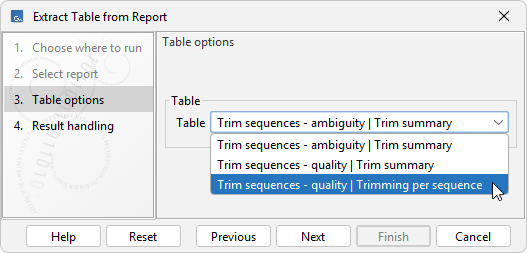
Figure 38.7: Selecting a table to extract from a report.
- Table The table to extract. The list contains all tables in the input report that can be extracted. Each table is identified by the titles of the sections in which it appears, with sections at different levels separated by "|". If a section contains more than one table, a table number is appended to distinguish the tables, for example "Results (Table 2)".
The tool outputs a single table () containing the same columns and rows as the selected table in the report (figure 38.8).
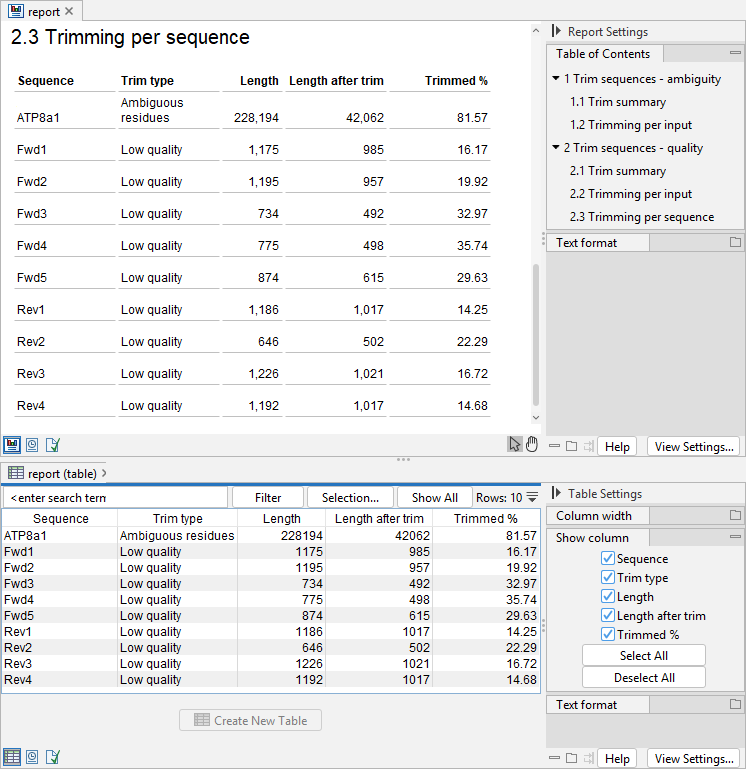
Figure 38.8: The table selected in figure 38.7, as displayed in the report (top) and as an extracted table (bottom).
Note: When configuring Extract Table from Report within a workflow, a template element must be used.