
Merge Tables
Merge Tables takes two elements with table views as input and combines their contents into a single table ( ) by matching rows based on one or more pairs of columns. If an input element has multiple table views, only its default table view is used.
To run the tool, go to:
Tools | Utility Tools ( ) | Merge Tables (
 )
The following options can be configured (figure 38.1):
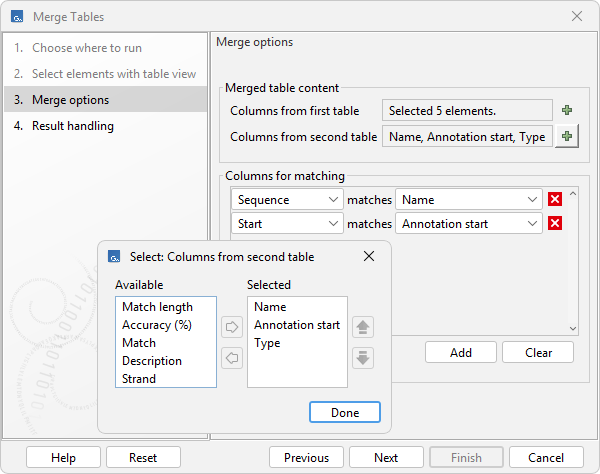
Figure 38.1: Options for merging two tables. In this example, five columns are used from the first table and three from the second table. Rows are matched using two column pairs. Rows are merged when the values in both column pairs are equal.
- Columns from first table Columns from the first input element used when merging the tables.
- Columns from second table Columns from the second input element used when merging the tables.
- Columns for matching One or more column pairs. Each pair specifies one column from the first table and one column from the second table.
Rows are considered matching when the values in all configured column pairs are equal.
For each row in the first table, values from the matching row in the second table are added to the output. Multiple rows in the first table may therefore match the same row in the second table. For the second table, the combination of values in the configured column pairs must uniquely identify each row.
The tool outputs a single merged table (). When matching rows are found, their selected columns are combined in the output. Rows from either table without a match are also added to the merged table. The resulting columns are constructed as follows:
- From the column pairs chosen in Columns for matching, only the column from the first table is included in the output, as the content of the column pairs is the same in both tables.
- The remaining columns selected in Columns from first table and Columns from second table are added to the merged table. If the tables contain columns with the same name and both columns are included in the merged table, the suffixes "(1)" and "(2)" are added to distinguish the columns originating from the first and second table, respectively.
Consider the following example, where the two tables below are merged.
| Sequence | Start | Name | Match | Type |
|---|---|---|---|---|
| seq1 | 629 | Motif 1 | AGTTTT | Motif |
| seq1 | 629 | Motif 3 | AGTTTT | Motif |
| seq1 | 1662 | Motif 2 | GGGGAC | Motif |
| seq2 | 186 | Motif 2 | GGGGAC | Motif |
| Name | Annotation start | Type |
|---|---|---|
| seq1 | 629 | Type 1 |
| seq2 | 186 | Type 2 |
| seq3 | 433 | Type 3 |
where all columns are included and the following column pairs are used for matching: Sequence matches Name, and Start matches Annotation start. The resulting table will be:
| Sequence | Start | Name | Match | Type (1) | Type (2) |
|---|---|---|---|---|---|
| seq1 | 629 | Motif 1 | AGTTTT | Motif | Type 1 |
| seq1 | 629 | Motif 3 | AGTTTT | Motif | Type 1 |
| seq1 | 1662 | Motif 2 | GGGGAC | Motif | |
| seq2 | 186 | Motif 2 | GGGGAC | Motif | Type 2 |
| seq3 | 433 | Type 3 |
Three rows from the first table have matching values in both column pairs. Two of these rows share the values (seq1, 629), while the third row has the values (seq2, 186). For each match, the columns from the second table are added to the output.
Rows from the first table without a corresponding match are added to the merged table, with empty values in columns originating from the second table. Likewise, rows from the second table without a corresponding match are added to the merged table, with empty values in columns originating from the first table.
Both Type and Name are present in both tables. These columns are handled as follows:
- Type appears twice in the output. The suffixes "(1)" and "(2)" distinguish the columns from the first and second input table, respectively.
- Because Name is used in the second table for matching rows, its values are not included separately in the output. The Name column in the merged table therefore originates from the first table.