
Adapter trimming
In the "Adapter trimming" wizard step (figure 29.3), adapter trimming options can be configured.
Trimming adapter sequence from reads before carrying out downstream analyses is important. This may have been done directly on the sequencing machine, but in some cases, some adapters remain.
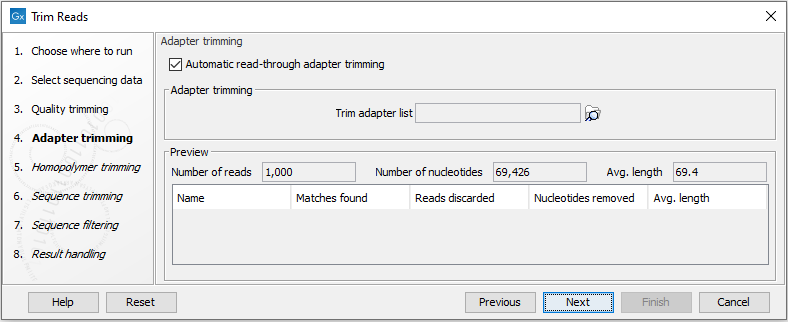
Figure 29.3: Trimming your sequencing data for adapter sequences.
Automatic read-through adapter trimming
The "Automatic read-through adapter trimming" option is selected by default. This detects read-through adapter sequence on paired-end reads. Read-through means that the sample DNA fragment being sequenced is shorter than the read length, such that the 3' end of one read includes the reverse-complement of the adapter from the start of the other read. Leaving this option selected is always recommended. The trimming performed automatically can detect read-through of even a single nucleotide, which is not the case when trimming using a trim adapter list. The detected adapters for the first and second read for each sequence list can be found in the Trim Reads report.
Notes about "Automatic read-through adapter trimming":
- Overlap is detected in paired reads containing standard nucleotides (A, T, C, and G). If a read contains ambiguous symbols, such as N, these will not match the standard nucleotides.
- The first and second read should be of equal or near-equal length. Read-through detection will be much less effective for read pairs with asymmetric read lengths.
Trimming using a trim adapter list
When working with data of low quality, asymmetric read lengths, mate-paired reads, single reads, small RNAs, or when working with gene specific primers, specifying a trim adapter list is recommended, in addition to using the "Automatic read-through adapter trimming" option. The Trim Reads report from an initial run may help determine what to include in a trim adapter list for a particular data set.
The Preview panel shows the results of trimming with the supplied trim adapter list on 1000 reads from the input data (figure 29.3). Where the sequence list is long enough, these will be reads 1001-2000. This provides an idea of the effect of using the trim adapter list on the input data.
The following information is shown in the Preview panel:
- Name. The adapter name.
- Matches found. Number of matches found.
- Reads discarded. The number of reads completely trimmed away.
- Nucleotides removed. The number of nucleotides trimmed. This includes those from reads trimmed away completely.
- Avg. length The average length of the reads retained.