
Pairwise comparison
For a given set of aligned sequences it is possible to make a pairwise comparison in which each pair of sequences are compared to each other. This provides an overview of the diversity among the sequences in the alignment.
In CLC Genomics Workbench this is done by creating a comparison table:
Tools | Classical Sequence Analysis ( ) | Alignments and Trees (
 ) | Create Pairwise Comparison (
 )
)
A pairwise comparison can also be performed for a selected part of an alignment directly in the Alignment view:
- Right-click on an alignment selection.
- Choose Create Pairwise Comparison... ().
There are five kinds of comparisons that can be made between the sequences in the alignment (figure 25.20).
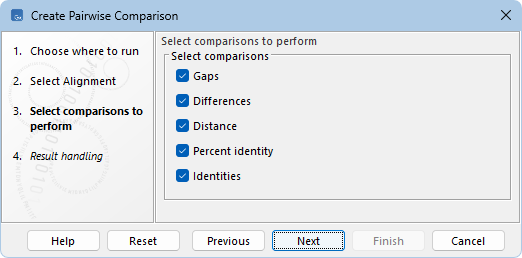
Figure 25.20: Adjusting parameters for pairwise comparison.
- Gaps. Calculates the number of alignment positions where one sequence has a gap and the other does not.
- Differences. Calculates the number of alignment positions where one sequence is different from the other. This includes gap differences as in the "Gaps" comparison.
- Distance. Calculates the Jukes-Cantor distance between the two sequences. This number is given as the Jukes-Cantor correction of the proportion between identical and overlapping alignment positions between the two sequences.
- Percent identity. Calculates the percentage of identical residues in alignment positions to overlapping alignment positions between the two sequences. An overlapping alignment position is a position where at least one residue is present, rather than only gaps.
- Identities. Calculates the number of identical alignment positions to overlapping alignment positions between the two sequences.
Subsections