
History view
CLC data elements contain information about their creation and modification. This information is available in the History view ( ) (figure 2.23).
History information can be exported using dedicated history exporters. For reports, history information is included when exporting to JSON format, and can optionally be included when exporting to PDF files.
Opening the History view
To open the History view of a data element open in the View area, click on the Show History () icon at the bottom of the open view.
A data element can also be opened directly to the History view from the Navigation Area by using a right-click menu option:
right-click on an element in the Navigation Area | Show | History ()
History view explanation
The table at the top of the History view contains a row for each operation that has affected this data element. When rows are selected in the table, full details for those operations are displayed in the bottom panel (figure 2.23).
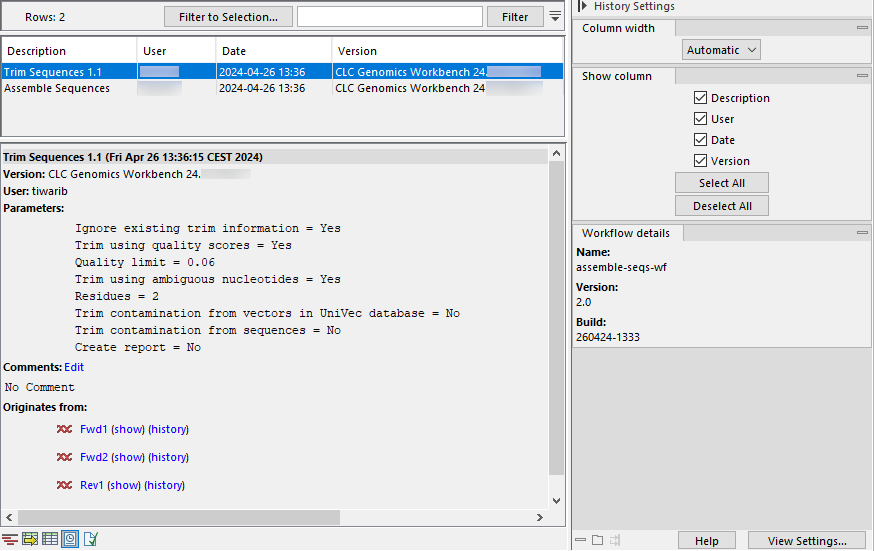
Figure 2.23: The history of an element created by an installed workflow called assemble-seqs-wf.
Information in the table:
Summary information is shown in the table for each operation carried out in the creation of this data element:
- Description The operation performed
- User The username of the person who performed the operation. If you import data created by another person, that person's username will be shown.
- Date and time Date and time the operation was carried out. These are displayed according to your locale settings (see General Preferences).
- Version The software name and version used for that operation.
Information in the lower panel:
- Parameters The parameter values used for an analysis.
- Comments Additional details added here by tools or details that have been added manually. Click on Edit to add information to this field.
- Originates from A list of the elements that the current element originated from. Clicking on the name of an originating element selects it in the Navigation Area. Click on the "(show)" link to open the originating element to its default view. Click on "(history)" to open the originating element to its History view.
Information in the side panel:
- Column width
- Show column
- Workflow details Present if the element is an output from a workflow.
Outputs from installed or template workflows: The name, version and build id of the workflow are recorded2.1.
Outputs from workflows launched from the Workflow Editor:
- If an installer has never been made for that workflow, the workflow name and the version
0.1are recorded. - If an installer has been made from that workflow at some point, the workflow name and a version is recorded. The version is the same as the one assigned when the most recent installer was made. See Creating a workflow installation file for further details.
- If an installer has never been made for that workflow, the workflow name and the version
Footnotes
- ... recorded2.1
- Workflow build ids are included in the history of elements generated using version 24.0 or later.