
Licensing server extensions
Using online licensing
If online licensing is being used for the CLC Server, a valid online server extension license must be available, but no further configuration of the server is needed. If the license has been added since the last time the CLC Server was restarted, a restart will be needed.
Using license files
If the CLC Server is configured to use license files, then a valid server extension license file must be present to use the functionality provided by the CLC Microbial Genomics Server Extension.
To obtain, install, and make use of license files for the CLC Server:
- Log into the web client of the single server or master node as an administrative user.
- Under the Management (
 ) tab, expand the Licensing (
 ) tab.
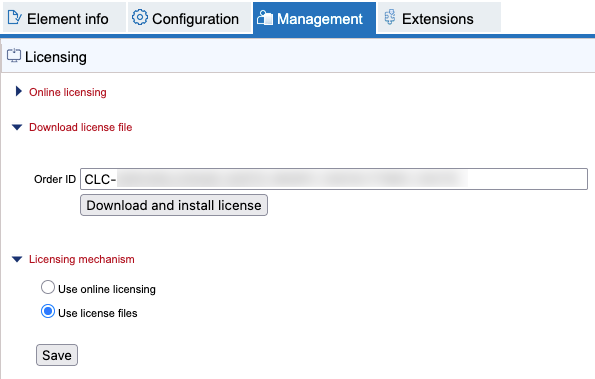
Figure 1.6: License files can be downloaded and installed under the Licensing section of the Management tab. - Expand the Download license file section, enter the Order ID supplied by QIAGEN into the Order ID field, and click "Download and install license".
- Expand the Licensing mechanism section. If "Use License files" is not already selected, select it and then click the Save button.
Please contact ts-bioinformatics@qiagen.com if you will be using license files but have not received an Order ID.
Note: Each time a license is downloaded, a new file is created in the licenses folder under the CLC Server installation area. If you are upgrading a license, delete the old license file.
The CLC Server must be restarted for new license files to be loaded. You are offered the option to restart the CLC Server after downloading the license file. The server can be started later instead, for example if you wish to carry out multiple administrative tasks before restarting.
If you are working on a system that does not have access to the external network, then please refer to the information about downloading a static license on a non-networked machine.
Note: Each time a license is downloaded, a new file is created in the licenses folder under the CLC Server installation area. If you are upgrading a license, delete the old license file before restarting the server.