
LDAP directory
Using the LDAP directory option, information needed during authentication and group memberships is retrieved from the specified LDAP directory. Encryption options are available (StartTLS and LDAPS). See figure 5.3.
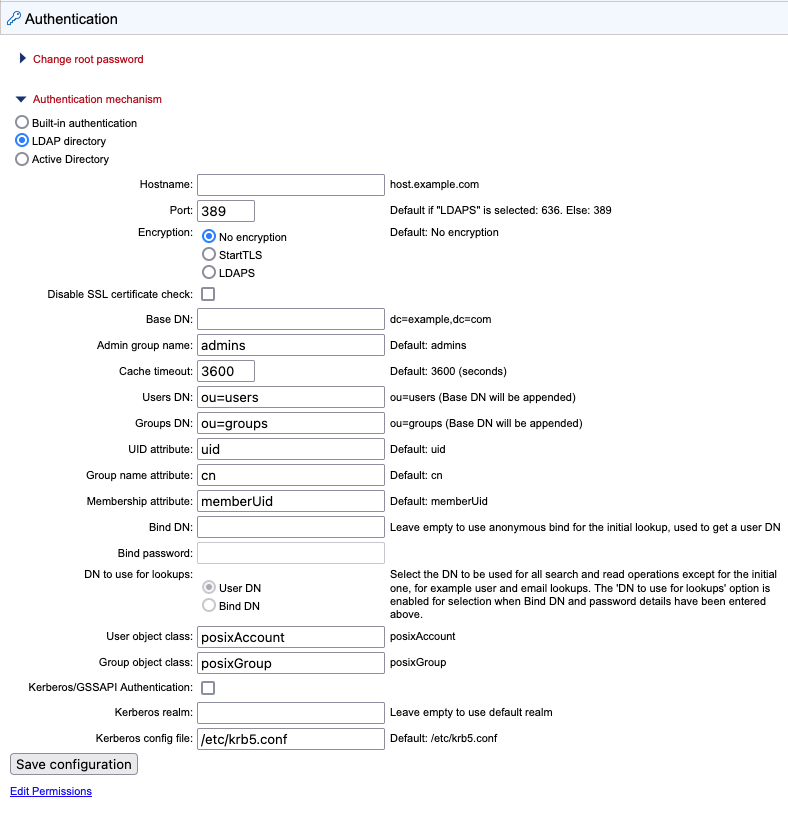
Figure 5.3: LDAP settings panel
Configuration information
Encryption Specify whether communication should be encrypted. The options are "No encryption" (the default), "StartTLS" and "LDAPS".
With encryption enabled, the SSL certificate of the LDAP/AD server must be trusted by the CLC Server. If the certificate is signed by a trusted CA then no further steps are necessary. If the certificate is signed by an internal CA or is self-signed, the internal CA certificate or the self-signed certificate must be added to the truststore. Information about adding a certificate to the truststore is provided in the Certificates section below. To skip the certificate check, enable the Disable SSL certificate check option.
Admin group name Provide the name of the admin group. This setting is case sensitive. See also Giving users administration rights.
Groups DN Provide the relative path for an OU in the domain to act as the root used by the CLC Server. The groups available for selection when setting permissions are limited to those in or below that OU.
Using OU=bioinformatics, OU=researchers as an example, the list of groups available when setting permissions would be limited to those contained in the OU bioinformatics, which is in the OU researchers, which is in the root of the domain. If the Groups DN field is left empty, all groups in the AD will be available for selection when setting group level permissions.
See Controlling group access to CLC Server data and Controlling access to the server, server tasks and external data for further information about restricting access based on group membership.
Bind DN Specify a DN to use for the initial lookup to obtain a User DN (based on the username). The DN to use for subsequent lookups is specified in the "DN to use for lookups" option, described below. Leave this field empty to use an anonymous bind for the initial lookup and the user bind for subsequent lookups.
DN to use for lookups Specify whether to use the Bind DN or the User DN for read and search operations. This option is enabled if the Bind DN and Bind password fields have been filled in.
User object class Specify a user object class. If this field is empty, "posixAccount" is used.
Group object class Specify a group object class. If this field is empty, "posixGroup" is used.
Kerberos/GSSAPI Authentication Enable the LDAP integration to use Kerberos/GSSAPI.
Certificates
If encryption has been enabled and the LDAP/AD server uses a certificate signed by an internal CA or a self-signed certificate, that certificate must be added to the CLC Server truststore, which is located under the CLC Server installation folder at jre/lib/security/cacerts.
This can be done using the Java keytool shipped with the CLC Server, with a command taking this form:
	CLC_SERVER_BASE/jre/bin/keytool -import -alias \
	ldap_certificate -file LDAP_CERTIFICATE.cer -keystore \
	CLC_SERVER_BASE/jre/lib/security/cacerts -storepass changeit
In the command above, replace the generic information with information relevant for your setup. Specifically:
- Replace CLC_SERVER_BASE with the path to the CLC Server installation directory.
- Replace LDAP_CERTIFICATE with the path to the certificate your LDAP server uses for Start TLS/LDAPS connections.
- Replace changeit with the password for the truststore. ("changeit" is the default password.)
For setups with nodes, the following must also be done:
- For job node setups: Update the truststore of the CLC Server installation on each job node.
- For grid setups: Update the truststore for each grid worker. The location of grid workers can be found in the configuration of the grid presets in the web administrative interface under Configuration (
 ) | Job processing (
 ) | Server settings.
Caution:
- When the CLC Server is updated or the software is re-installed, all imported certificates will be removed, and must be imported again.
- Certificates have an expiration date. A new certificate should be added in advance of that date.