
Active Directory
When using the Active Directory option, information needed during authentication and group memberships is retrieved from the specified Active Directory. Encryption options are available (StartTLS and LDAPS). See figure 5.4.
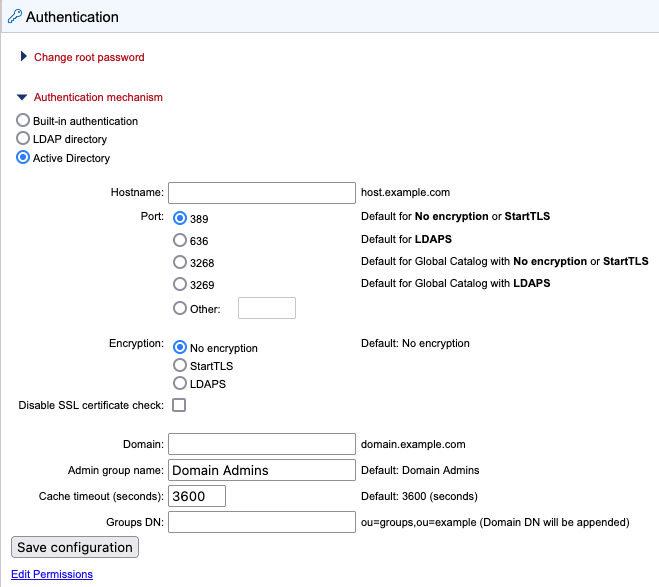
Figure 5.4: Active Directory settings panel
Hostname We recommend entering a Global Catalog server in the Hostname field and configuring a relevant port for communication with a Global Catalog (see below).
Using a Global Catalog avoids the CLC Server being redirected to several different Domain Controllers to obtain information about users and groups, and can thereby speed up the response time considerably in complex network environments.
Port Specify the port to use from the list of commonly used ports, or by specifying the port of your choice.
Note that to use a Global Catalog, one of the following ports must be selected:
- 3268 Uses LDAP. Relevant when the encryption option "No encryption" or "StartTLS" has been selected. Comparable to port 389.
OR
- 3269 Uses LDAPS. Relevant when the "LDAPS" encryption option has been selected. Comparable to port 636.
Encryption Specify whether communication should be encrypted. The options are "No encryption" (the default), "StartTLS" and "LDAPS".
With encryption enabled, the SSL certificate of the LDAP/AD server must be trusted by the CLC Server. If the certificate is signed by a trusted CA then no further steps are necessary. If the certificate is signed by an internal CA or is self-signed, the internal CA certificate or the self-signed certificate must be added to the truststore. Information about adding a certificate to the truststore is provided in the Certificates section below. To skip the certificate check, enable the Disable SSL certificate check option.
Domain Provide a domain that will be appended to the username provided when logging in. See the Domain setting details section below for further details.
Admin group name Provide the name of the admin group. This setting is case sensitive. See also Giving users administration rights.
Groups DN Provide the relative path for an OU in the domain to act as the root used by the CLC Server. The groups available for selection when setting permissions are limited to those in or below that OU.
Using OU=bioinformatics, OU=researchers as an example, the list of groups available when setting permissions would be limited to those contained in the OU bioinformatics, which is in the OU researchers, which is in the root of the domain. If the Groups DN field is left empty, all groups in the AD will be available for selection when setting group level permissions.
See Controlling group access to CLC Server data and Controlling access to the server, server tasks and external data for further information about restricting access based on group membership.
Domain setting details
Users in the domain entered in the Domain field can log in using just their username. The CLC Server interprets this as username@domain.
When the Allow multi domain box is checked, the Domain field becomes the Default domain. Users in the default domain can log in using just their username. Users in other domains can also log in, but they must use one of the following identifier forms:
- username@full.domain
- username@domain
- UserPrincipalName
When the Allow multi domain option is checked and no Default domain is provided, all users must use one of those three identifier forms to log in.
Considerations:
- Access to the CLC Server can be limited using group permissions. See Controlling access to the server, server tasks and external data for details.
- It is highly recommended that a given user consistently uses just one identifier form when logging into the CLC Server. Having the same identity ensures easy traceability (e.g. tracing activity in the audit log) and consistent access to user resources (e.g. ownership of recycle bins, access to User Homes folders).