
Tree table view
The Table view contains a row per node in the tree. The rows contain tree-specific information, i.e., Node type, Branch length, and Bootstrap value as well as information from the sequences/sequence alignments, the tree was created from, e.g, Latin name, Taxonomy, or any custom attributes.
This information may be used by palettes in the Tree Side Panel for visualization purposes.
Standard functionality for working with tables applies.
Tree table right-click menu
Extract or align sequences
It is possible to extract or align a subset of the underlying sequence data directly from the table using the right-click menu:
- Extract Sequence List. Extracts the sequences associated with the selected leaf nodes to a new sequence list.
- Align Sequences. The sequences associated with the selected leaf nodes are extracted and used as input to the tool Create Alignment.
Please note that all extracted sequences are copies and any changes to these sequences will not be reflected in the tree.
Add or modify attributes on a tree
Attributes (columns in Table view) can be added, edited and deleted using the right-click menu options (see figure 18.17):
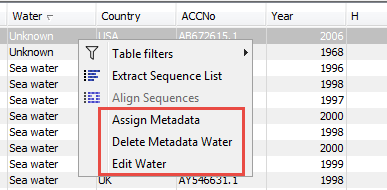
Figure 18.17: Right-click attribute options in the tree table.
- Add Attributes.... Adds a new column to the table with the name you provide, and the value you provided is added for all of the selected rows.
- Edit Attribute.... Changes the attribute value for the selected row(s). The value can also be removed this way, but please note that if all values for an attribute are removed, the attribute column will be removed as well.
- Delete Attribute.... Deletes the entire attribute column, removing the values from all table rows.
The right-click options are good for small lists and simple changes. For more detailed work, use the tool Update Sequence Attributes, which supports importing attributes from external sources, such as Excel and CSV format files.
The tool can be launched from the Toolbox or directly from the table, by clicking the Add Attributes button at the bottom of the view.