
Create Motif List
A motif list ( ) (figure 19.22) contains motifs for use in searches and annotations. Creating a motif list allows managing multiple motifs efficiently, combining motifs of different types, and reusing them across sequences.
An empty motif list can be created using one of the following:
File | New | Motif List ( )
)
Tools | General Sequence Analysis ( )| Motif (
 ) | Create Motif List ()

Figure 19.22: A motif list containing two simple motifs and one Java regular expression motif.
The following actions are available at the bottom of the motif list:
- Click the Add (
 ) button to open the "Add Motif" dialog (figure 19.23).
The following options can be configured:
- Motif type Simple motif, Java regular expression, or Prosite regular expression.
- Motif The motif sequence. See Motif types for syntax details.
- Name A name for the motif.
- Description (Optional) A description for the motif.
- Annotation type The annotation type used when annotating detected motifs.
- Annotation notes (Optional) Additional information about the motif. Multiple notes can be added using Add qualifier/key.
The Name, Description, Annotation type, and Annotation notes are included in motif search results.
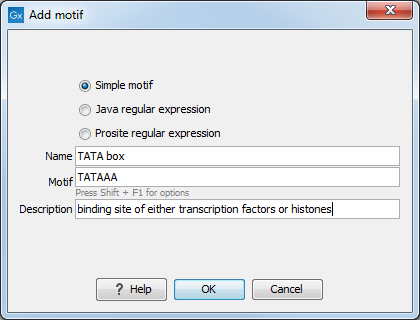
Figure 19.23: Adding the TATA box motif to a motif list. - Click the Edit (
 ) button to open the "Edit Motif" dialog for the selected motif.
The dialog has the same configuration options as "Add Motif". A motif can also be edited by double-clicking it.
- Click the Delete (
 ) button to remove selected motifs. Alternatively, press the Delete key.
To select multiple motifs, hold Ctrl (
 on Mac) and click each desired motif. To select a range, hold Shift and click the first and last motif.
- Click the Create New Motif List () button to create a new motif list containing only the selected motifs.
- Click the More... button and select Import from Fasta File (
 ) to add simple motifs from a Fasta file.
A motif is created for each sequence in the file using its name, description, and sequence information. The annotation type is set to "Motif". Only simple motifs can be imported from a Fasta file.
- Click the More... button and select Add Motifs from Sequences button to launch Create Motif List from Sequences ().
The motifs created from the selected sequences are added to the motif list. When duplicated motifs are collapsed, existing motifs in the list may be updated.
Selected motifs can be copied and pasted between motif lists:
- To copy motifs, right-click the selection, choose Edit and then Copy (
 ), or use the keyboard shortcut Ctrl (
on Mac) + C.
), or use the keyboard shortcut Ctrl (
on Mac) + C.
- To paste motifs, right-click a motif, select Edit and then Paste (
 ), or use the keyboard shortcut Ctrl (
on Mac) + V.
), or use the keyboard shortcut Ctrl (
on Mac) + V.
- Copied motifs can also be stored in a text file and pasted back into a motif list later.
See Working with tables for further information about working with tables.
Save the motif list in the Navigation Area to make it available for motif searches.