
Simple filtering
When a table is first opened, a simple filtering field is available at the top (figure 9.3). Filtering is applied as search terms are entered, so that only rows containing the entered terms are shown. For large tables (more than 10,000 rows), filtering is applied only after clicking the Filter button.
Focus can be moved to the search field either by clicking inside it or by pressing the keyboard shortcut Ctrl + F ( + F on Mac).
For general information, see Filtering tables.
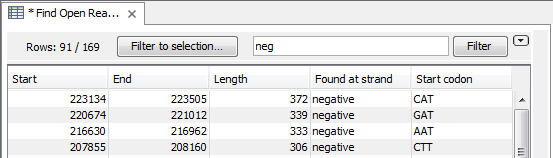
Figure 9.3: Filtering for rows that contain the term "neg".
The following characters have special meanings when used in the simple filtering field:
- Space Terms separated by spaces are treated as individual search terms unless the terms are placed within quotes. E.g. the term
cat dogwould return all rows with the termcatand/or the termdogin them, in any order. - Single and double quotes
'and"Enclose a term containing spaces in quotes to search for exactly that term. E.g."cat dog"would return rows containing the single termcat dog. - Backslash
\Use this term to escape special characters. For example, to search for the term"cat"including the quotation marks, enter\"cat\". - Minus
-Place a minus symbol before a term to exclude rows containing that term. e.g.-cat -dogwould exclude all rows containing eithercatordog. - Colon
:Specify the name of a column to be searched for the term. E.g.Animal:catwould search for the termcatonly in a column calledAnimal. See also advanced filtering.