
Redo alignments
The Redo alignments option becomes available when an alignment is provided as input to the Create Alignment tool (figure 17.1).
- Leave this box unchecked when aligning additional sequences to the original alignment. Equal sized gaps may be inserted in all sequences of the original alignment to accommodate the alignment of the new sequences (figure 17.5), but apart from this, positions in the original alignment are fixed.
- Check this box to realign the sequences in the alignment provided as input. This can be useful e.g. if you wish to realign using different gap costs than used originally.
A new alignment is output, whether or not the Redo alignments option is checked.
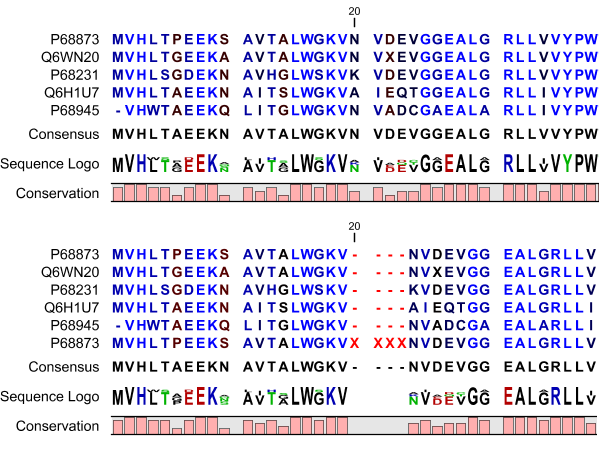
Figure 17.5: The original alignment is shown at the top. That alignment and a single additional sequence, with four Xs added for illustrative purposes, were used as input to the "Create Alignment" tool. The "Redo alignments" option was left unchecked. The resulting alignment is shown at the bottom. Gaps have been added, compared to the original alignment, to accommodate the new sequence. All other positions are aligned as they were in the original alignment.