
Extract Sequences
Extract Sequences takes as input an element containing sequences and outputs those sequences either as sequence lists or as individual sequences.
The following element types can be used as input:
- Alignment (
 )
)
- BLAST result (
 ) and BLAST overview table (
 )
)
Only the sequence hits are extracted. The original query sequence and consensus sequence are not extracted.
- Contig and read mapping (
 ) (
) ( )
)
Only the read sequences are extracted. The reference and consensus sequences are not extracted.
- Sequence list (
 ) (
) ( )
)
Using a sequence list as input is mainly useful when creating individual sequences from each sequence in the list, which is relatively uncommon.
All sequences contained in the selected input element are extracted. To create a subset of the input element, see the documentation for the relevant element type.
To run the tool, go to:
Tools | General Sequence Analysis ( )| Extract Sequences (
 )
)
In the "Result handling" wizard step, select the output type: either Single sequences or Sequence lists (figure 19.15). A sequence list is typically the preferred output type. The bottom of the wizard displays the number of sequences extracted.
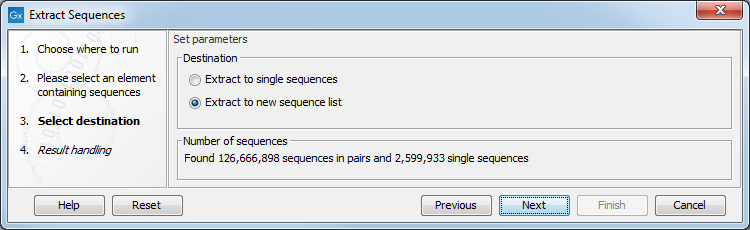
Figure 19.15: Sequences can be extracted to individual sequences or sequence lists.