
Using motifs in sequence analysis
Motifs can be used for more than just locating specific patterns within sequences. A few illustrative examples are provided below.
If these types of analyses are performed often, we recommend building workflows that include the necessary tools and options.
Transfer annotations
To transfer annotations from one sequence to another, the recommended approach is first to create an alignment and then use Copy Annotation to Other Sequences....
If sequences are too dissimilar for reliable alignment-based transfer, simple annotations can be transferred using motifs. The following workflow illustrates this approach (figure 19.32):
- Create a list of motifs from the source sequences containing the annotations to be transferred using Create Motif List from Sequences.
- Run Motif Search on the target sequences, selecting the motif list created before, and choose to add annotations to the sequences.
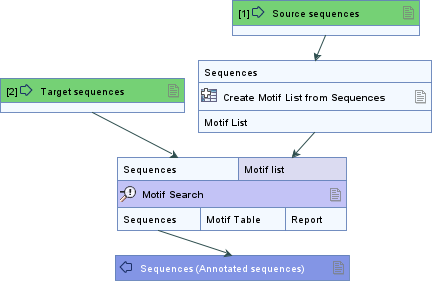
Figure 19.32: Workflow example to transfer simple annotations.
Note that spliced annotations and annotations with uncertain positions cannot be reliably transferred using this approach.
Filter sequences
Motifs can also be used to subset sequences based on their presence or absence (figure 19.33):
- Run Motif Search on the sequences and select the option to create a match table.
- Optionally, use Filter on Custom Criteria to select matches of interest from the match table. Filtering can be configured to, for example:
- Require some motifs to match 100% accuracy, while others can allow lower thresholds (e.g., 80%).
- Restrict matches to specific sequence positions using the start and/or end locations.
- Require certain motifs to occur on a specific strand, while others may be allowed on both strands.
All columns in the table produced by Motif Search can be used for filtering.
- Run Filter Based on Name on the sequences, set Elements containing names to the (filtered) match table, and choose to keep or remove the matches, depending on the desired outcome.
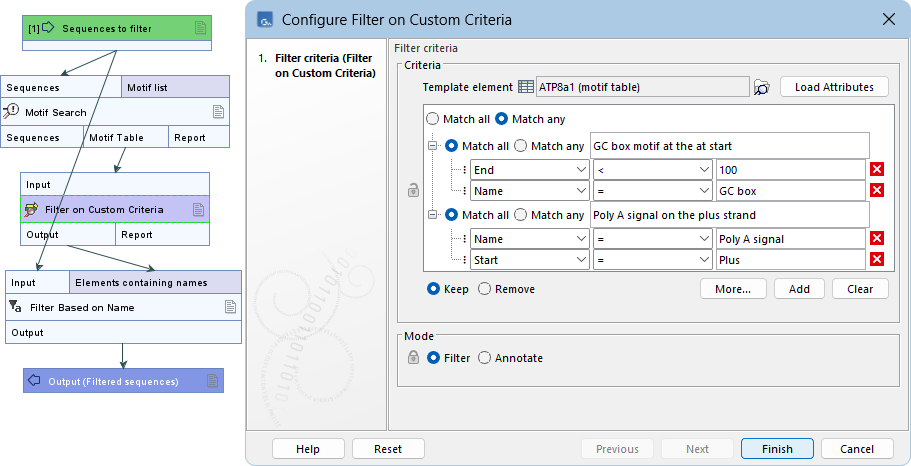
Figure 19.33: Workflow example to filter sequences based on the presence or absence of motifs. Matches are filtered using Filter on Custom Criteria.