
Export of reports
Reports can be exported to Excel, JSON and PDF formats.
Excel exports
Tabular data is and the underlying data used for the plots from the report are exported as tables. Plot images from the report are not included in the exported file.
When exporting a single report, an Excel file containing a single sheet is created. If multiple reports are selected and the "Output as single file" option is checked, each report's content is placed in a separate sheet. For example, if three reports were exported to a single file, an Excel file containing three sheets would be created. The original report name is used for the corresponding sheet name.
JSON export
See JSON export.
PDF export
Tabular data is exported as tables and the plots from the report are included as images. The underlying data used for the plots in the report is not included in the exported file.
The report history, a title page and a table of contents can optionally be included in the exported file (figure 8.12). Pages in the pdf are numbered.
Note: The username of the person who generated the report and the date and time the report was generated are included on the title page and in the history. At least one of these should be included in the PDF export if that information should be present in the exported file.
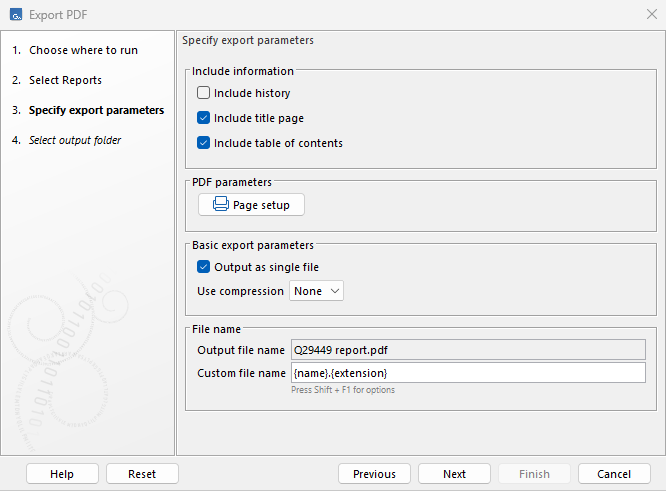
Figure 8.12: With these settings, the PDF file would include a title page and a table of contents but not the report history.
If multiple reports are selected, each will be exported to a separate file whether or not the export is run in Batch mode.