
Branching elements
Branching elements control the path that data takes through a workflow.
Branch on Item Count
Branch on Item Count ( ) controls the flow of elements based on their item count or that of another element. The input element flows through the Pass or Fail output channel, depending on whether the item count meets the defined condition (figure 14.58).
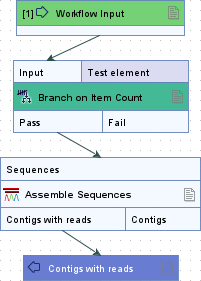
Figure 14.58: Sequences that meet the condition specified in the Branch on Item Count element flow through the Pass output channel and continue to the Assemble Sequences step. Sequences that do not meet the condition flow through the Fail output channel and are not processed further.
The following options can be configured (figure 14.59):
- Test element (Optional) Counts items in this element. If empty, counts items in the input element.
- Comparison Operator for evaluation:
 ,
, =or .
.
- Number of items Value used for comparison.
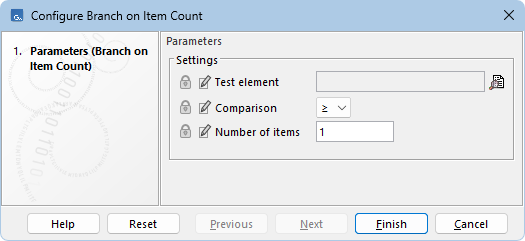
Figure 14.59: Configuration of a Branch on Item Count element.
Many element types containing countable items can be used with Branch on Item Count. Examples of countable items include sequences in a sequence list ( ) (
) ( ) or an alignment (
 ), or reads in a stand-alone read mapping (
 ).
).