
LightSpeed Fastq to Methylation and Germline Variants (beta)
The LightSpeed Fastq to Methylation and Germline Variants (beta) tool is designed to provide methylation and germline variant calls from directional, paired-end data generated using positive-readout methylation assays.
The tool can perform read trimming, mapping, deduplication, local realignment, genotype-aware methylation calling, correction of the read mapping, and germline variant calling. For a description of each step, see LightSpeed Methods.
LightSpeed Fastq to Methylation and Germline Variants (beta) can only analyze one sample per analysis start. To analyze samples in batch, LightSpeed Fastq to Methylation and Germline Variants (beta) must be included in a workflow (see Batching). Read about workflows here: https://resources.qiagenbioinformatics.com/manuals/clcgenomicsworkbench/current/index.php?manual=Workflows.html.
Note: The tool is in beta. It is under active development and subject to change without notice. Generated results may not be accessible when later versions of the plugin are installed.
To run the LightSpeed tool go to:
Tools | LightSpeed ( ) | LightSpeed Fastq to Methylation and Germline Variants (beta) (
 )
If you are connected to a CLC Server via your Workbench, you will be asked where you would like to run the analysis. We recommend that you run the analysis on a CLC Server when possible.
In the first wizard step, specify fastq files, a reference sequence, and, optionally, tracks for reference masking and target regions (figure 11.1):
- Input data
- Reads (fastq) Fastq files for analysis. At least two fastq files representing R1 and R2 reads must be provided.
- References
- References The reference sequence that reads will be mapped to.
- Reference masking
- No masking Reads are mapped to the full reference sequence.
- Exclude annotated Reads are mapped to the full reference sequence except regions specified in the masking track.
- Include annotated only Reads are only mapped to the regions specified in the masking track.
- Masking track The track specifying the masking regions.
- Target regions
- Target regions track Optional: A track providing the genomic regions of interest. The track is used for target region coverage and specificity metrics and can also be used to restrict methylation and variant calling.
- Target region extension for specificity metrics (bp) The number of bases by which target regions are extended when calculating specificity metrics.
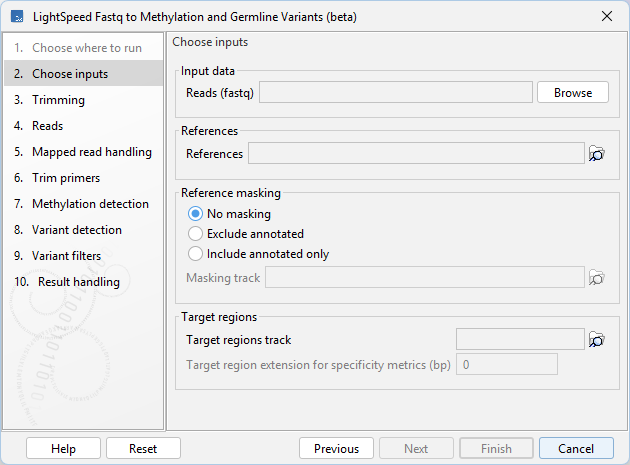
Figure 11.1: Input fastq files and references, and, optionally, tracks for reference masking and target regions.
Next, options are available for trimming (figure 11.2):
- Quality trimming
- Quality trim Reads are trimmed for low quality nucleotides. Note that 5' quality trimming is not recommended for methylation analysis. M-bias analysis detects position-specific methylation bias and may mask affected bases from the 5' ends of reads. Trimming these bases beforehand may interfere with this analysis. Therefore, if quality trimming is applied, it is recommend to also check Only quality trim from 3' end.
- Quality trim limit Adjust the quality trim limit for softer or harder trimming. Read more about the quality trim limit here: https://resources.qiagenbioinformatics.com/manuals/clcgenomicsworkbench/current/index.php?manual=Quality_trimming.html.
- Minimum read length after quality trim Trimmed reads shorter than this length are removed.
- Only quality trim from 3' end When checked, only the 3' ends of reads are trimmed for low quality nucleotides. This option is recommended for analyses where deduplication is included, because deduplication relies on the 5' positions of R1 and R2.
- Adapter trimming
- Adapter trim Reads are trimmed for read-through adapter sequence.
- Minimum read length after adapter trim Trimmed reads shorter than this length are removed.
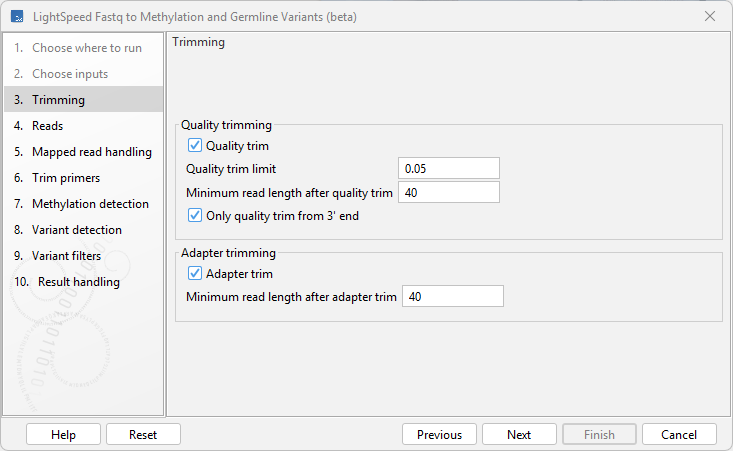
Figure 11.2: Options for trimming.
Next, options are available for UMI and duplicate reads (figure 11.3):
- UMI read structure
- UMI preset Specify where the UMI is placed in the reads. If a preset for a specific panel type is selected, the UMI and common sequence position and length are automatically adjusted to match the panel design.
- No UMI Select for reads that do not have UMIs.
- Custom Select to specify a protocol-specific read and UMI structure.
- QIAseq Targeted DNA Select if you are analyzing data from a QIAseq Targeted DNA panel.
- QIAseq Targeted DNA Pro Select if you are analyzing data from a QIAseq Targeted DNA Pro panel.
- QIAseq Targeted DNA Ultra Select if you are analyzing data from a QIAseq Targeted DNA Ultra panel.
- QIAseq Multimodal DNA/RNA Library Kit Select if you are analyzing data generated with the QIAseq Multimodal DNA/RNA Library Kit.
- TSO500 Select if you are analyzing data from a TSO500 protocol utilizing duplex UMIs.
- Twist UMI Select if you are analyzing data from a Twist protocol utilizing duplex UMIs.
- Roche KAPA UMI Select if you are analyzing data from a KAPA protocol utilizing duplex UMIs.
- Agilent MBC Select if you are analyzing data from an Agilent protocol utilizing duplex UMIs.
- UMI length (Read 1) The number of nucleotides at the start of read 1 that are part of the UMI.
- Common sequence length (Read 1) The number of nucleotides between the UMI and the biological sequence in read 1. These nucleotides are discarded.
- UMI length (Read 2) The number of nucleotides at the start of read 2 that are part of the UMI.
- Common sequence length (Read 2) The number of nucleotides between the UMI and the biological sequence in read 2. These nucleotides are discarded.
- Calculate duplex consensus reads Check this option to collapse simplex UMI reads sharing a UMI and mapping position, that originate from different strands, to a duplex UMI read.
- UMI preset Specify where the UMI is placed in the reads. If a preset for a specific panel type is selected, the UMI and common sequence position and length are automatically adjusted to match the panel design.
- UMI settings
- Retrieve UMI from fastq header Check this option if the UMI sequence is present in the fastq file read headers instead of being part of the sequencing reads. UMI and common sequence lengths must be specified below when this option is used.
- Minimum UMI group size Only UMI groups consisting of at least this number of input read pairs will be merged to consensus UMI reads. UMI groups with fewer input read pairs than this number will be discarded. A UMI group is a group of input read pairs with the same UMI sequence that maps to the same genomic position.
- Minimum size of a big UMI group Define the number of read pairs required for a UMI group to be considered a big UMI group. When variants are called, they are annotated with the number of big UMI groups supporting them.
- Maximum UMI differences Add input read pairs to the same UMI group when their UMIs have at most this number of mismatches. If UMIs are present on both read 1 and read 2 (duplex), this threshold operates on the sum of mismatches from the two UMIs.
- UMI window size Add input read pairs to the same UMI group when they map to genomic positions at most this number of bases apart.
- Keep duplex consensus reads only For duplex UMI protocols, check this option if only duplex reads should be retained. Simplex reads will be discarded.
- Duplicate read handling
- Discard duplicate mapped reads Reads likely representing PCR duplicates are grouped and the read pair with the fewest deviations from the reference is kept. If several read pairs have the same number of deviations, the read pair with the highest mapping quality is kept. This option is disabled when UMIs are used to group reads.
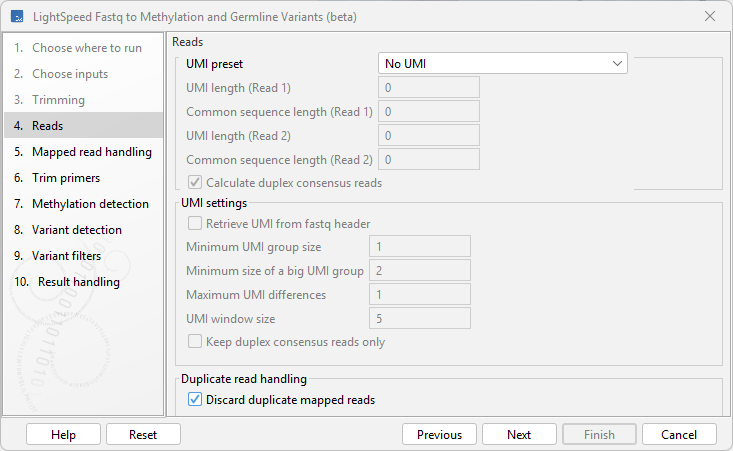
Figure 11.3: Options for UMI and duplicate reads.
Next options are available for removing ligation artifacts and for realignment (figure 11.4):
- Mapped read handling
- Remove ligation artifacts When enabled, reads identified as ligation artifacts are removed from the mapping.
- Minimum mismatches The number of mismatches required between a read and the reference for a read to be considered a potential ligation artifact.
- Ligation artifact recognition length The length of the window where the number of mismatches defined under Minimum mismatches must be present in a read, for that read to be considered a potential ligation artifact.
- Allow mismatch Enable to allow a single mismatch when comparing the extracted window sequence of the read to the nearby reference sequence.
- Optimize realignment for targeted data When enabled, realignment can process complex regions with high coverage that may be present in targeted data. Enabling can cause an increase in processing time, and is not recommended for WGS data.
- Remove ligation artifacts When enabled, reads identified as ligation artifacts are removed from the mapping.
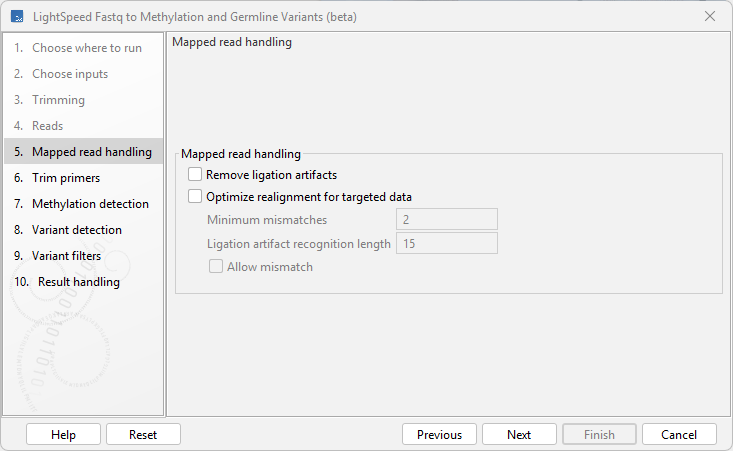
Figure 11.4: Options for removing ligation artifacts and for realignment.
Next, options are available for primer trimming (figure 11.5):
- Trim primers
- No primer trim Disable the trim primers step.
- Start of read 1 Primers are at the start of read 1.
- Start of read 2 Primers are at the start of read 2.
- Primers track Annotation track with location and strand of primers. Unalign parts of mapped reads that overlap a primer.
- Discard reads without primer Discard reads that do not overlap with a primer in the primers track.
- Additional bases to trim Unalign this number of additional mapped bases in reads matching a primer. Bases are unaligned at the beginning of the mapped read downstream from the primer.
- Minimum primer overlap (%) Reads overlap a primer when the expected part of the read (start of read 1 or read 2) maps to a genomic location that overlaps at least this percentage of a primer.
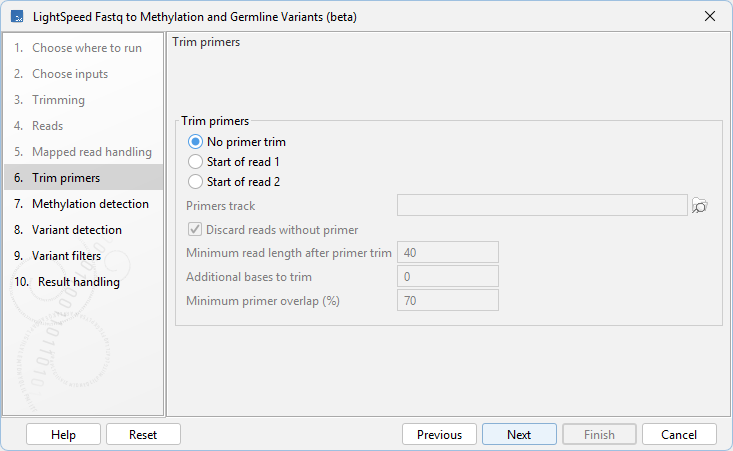
Figure 11.5: Options for primer trimming.
Next, options are available for methylation detection (figure 11.6):
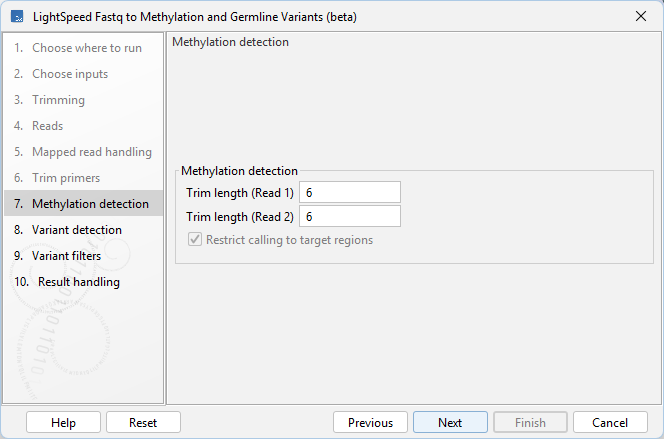
Figure 11.6: Options for methylation detection.
- Methylation detection
- Trim length (Read 1) Number of bases at the beginning of read 1 that are excluded from methylation conversion measurements. These bases can still contribute to sequence-genotype inference. Conversion rates can be biased at the beginning of reads. The M-bias plot in the Methylation detection section of the LightSpeed report can be used to assess an appropriate value, see Methylation detection.
- Trim length (Read 2) Number of bases at the beginning of read 2 that are excluded from methylation conversion measurements. These bases can still contribute to sequence-genotype inference. Conversion rates can be biased at the beginning of reads. The M-bias plot in the Methylation detection section of the LightSpeed report can be used to assess an appropriate value, see Methylation detection.
- Restrict calling to target regions When a Target regions track is provided, restrict methylation calling to those regions.
Next, options are available for variant detection (figure 11.7):
- Variant detection
- Ploidy The expected maximum number of different alleles.
- Ignore non-specific matches When enabled, reads that map to more than one genomic position equally well are not considered when calling variants.
- Adaptive use of non-specific matches When enabled, an adaptive approach to the use of non-specific reads is taken during variant calling. At positions with more than 10% specifically mapped reads the significance of candidate variants will be evaluated based on specifically mapped reads only. At positions with less than 10% specifically mapped reads the significance of candidate variants will be evaluated based on both specifically and non-specifically mapped reads. Note that count and coverage will always include non-specific reads when this is enabled. The adaptive approach facilitates being able to call variants in regions where reads are difficult to map while minimizing noise from poorly mapped reads in other regions.
- SNV sensitivity and precision Set the variant calling performance priority for SNVs. An SNV with a frequency that deviates from the expected frequency, given the specified ploidy (e.g. 50% or 100% for a ploidy of 2), is less likely to a be real variant and more likely to be caused by artifacts. The Sensitivity and precision option controls the degree to which SNVs are disqualified based on their observed frequency relative to the expected frequency. Higher sensitivity disqualifies fewer SNVs, Higher precision disqualifies more SNVs and Balanced is the intermediate setting.
- Restrict calling to target regions When a Target regions track is provided, restrict variant calling to those regions.
- Structural variant detection
- Lenient inversion detection When enabled, inversions with read support in only one direction at each breakpoint can be called. Enabling this option is recommended when analysing targeted data, but can increase processing time and can result in detection of more false positive inversions.
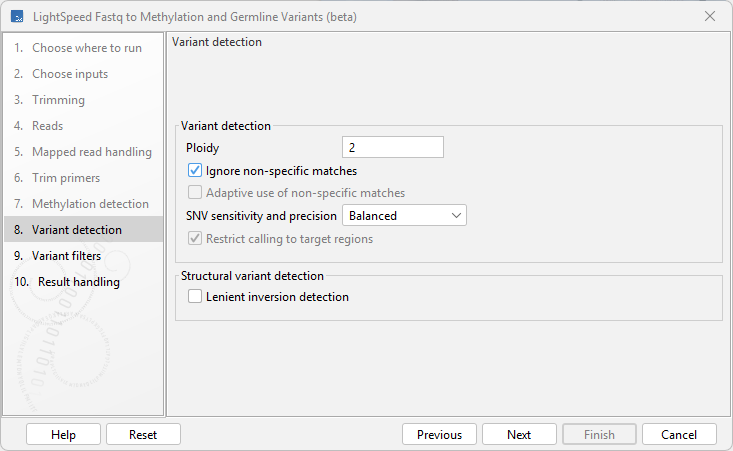
Figure 11.7: Options for variant detection.
Next, options are available for variant filtering (figure 11.8):
- Variant filters
- SNV minimum average quality The minimum average quality of detected SNVs and MNVs. Variants with a count above 10 and a frequency above 80% are exempted from this filter.
- Indel minimum average quality The minimum average quality of detected indels. Variants with a count above 10 and a frequency above 80% are exempted from this filter.
- Minimum average mapping quality The minimum average mapping quality of the variant supporting reads.
- Minimum average mapping quality ratio The minimum value of the ratio between the average mapping quality of the reads supporting a given allele and the average mapping quality of the reads supporting other alleles at the location.
- Minimum QUAL The minimum required QUAL score for detected variants. The QUAL score reflects the likelihood of the variant being a real variant.
- Minimum allele count The minimum allele count for detected variants.
When set to 1, special handling is applied to variants that are only supported by 1 read and have a coverage of 1 or 2. These variants are not assessed for significance, but are reported when the following criteria are met:
- The average quality score is 35 or higher.
- The site has no overlapping non-specific reads.
- Minimum frequency (%) The minimum frequency for detected variants.
- Strand balance threshold Threshold for a strand balance score for variants. The score is calculated as 1 - (p-value from binomial test given forward count, count, and forward count/coverage). Allowed range: 0.9 - 1.
- STR annotations and filter Annotate and filter variants that change the number of repeats in short tandem repeat (STR) regions, excluding homopolymers.
- Minimum repeat count The minimum number of repeats, excluding the variant, that an allele must have to be annotated as an STR variant. For example if a reference allele "AGAGAGAG" is called, and a low frequent stutter insertion allele is called "AGAGAGAGAG", the repeat count is 4.
- Minimum repeat region length The minimum length of all repeats combined, excluding the variant, that an allele must have to be annotated as an STR variant. For example if a reference allele "AGAGAGAG" is called, and a low frequent stutter insertion allele "AGAGAGAGAG" is called, the repeat region length is 8.
- Maximum repeat element length The maximum length of a repeat unit, that an allele can have to be annotated as an STR variant. For example, for the dinucleotide repeat "AGAGAGAG", the repeat unit length is 2.
- STR filter Enable to remove variants annotated as STR "Yes" from the results, provided that they are below the frequency threshold defined under "Remove STR variants with frequency below".
- Remove STR variants with frequency below Specify the frequency threshold below which STR variants will be removed from the results.
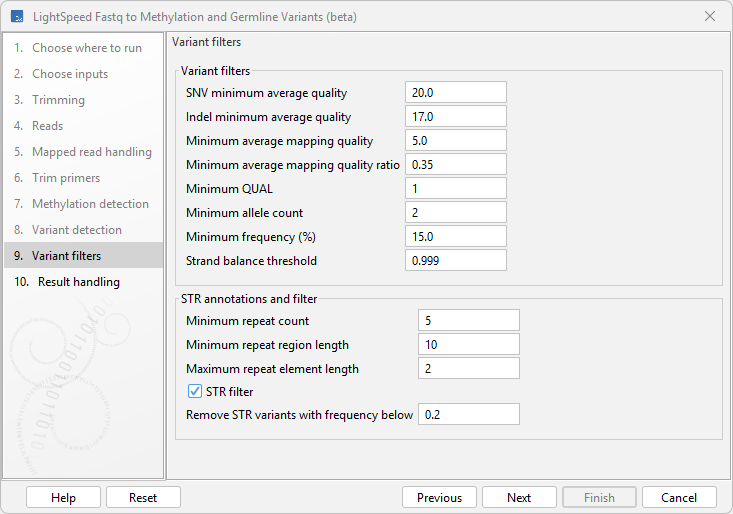
Figure 11.8: Options for variant filtering.
In the final wizard step, choose which outputs should be generated and whether results should be saved or opened. If a reads track is selected as output, runtime will increase.
Subsections