
Server maintenance
Settings to support carrying out of server maintenance tasks are found in the web client (figure 12.1) under:
Management ( ) | Server maintenance (
 )
)
The available options are:
- Normal Operation All users with permissions to log in can do so and jobs can be submitted for execution.
- Maintenance Mode This mode is generally used to smooth the user experience in the run up to restarting the CLC Server, for example, after installing plugins or updating licensing details.
In this mode:
- Jobs already submitted for execution will be run, allowing the queue to be cleared before the server is restarted.
- Admin users can continue to work using the web client, and can also also make use of the CLC Server Command Line Tools.
- Non-admin users already logged in are not logged out. In Workbench clients, this means that they cannot submit new jobs to the server, but they can continue to check the progress of jobs they already submitted, and view data stored in Server File System Locations. They cannot use the CLC Server Command Line Tools while the server is in maintenance mode.
- Neither admin nor non-admin users can log in from a CLC Workbench.
Text present in the "Message to users:" field when the Apply button is pressed will be included in dialogs presented to users logged into the CLC Server, and to users attempting to log in while the server is in maintenance mode (figure 12.2).
- Log Out Users The server is put into maintenance mode, but unlike when the "Maintenance Mode" option is selected, non-admin users are logged out from the server.
Text entered in the "Message to users:" field will be included in dialogs presented to users when they are being logged out of the CLC Server, and to users attempting to log in.
- Shut down The CLC Server and any attached job nodes will shut down. Users logged in will lose their connection with the server.
- Restart The CLC Server and any attached job nodes will be shut down and restarted. Users logged in will lose their connection with the server when it shuts down, but for users logged in via a CLC Workbench, the connection will be reestablished automatically when possible to do so.
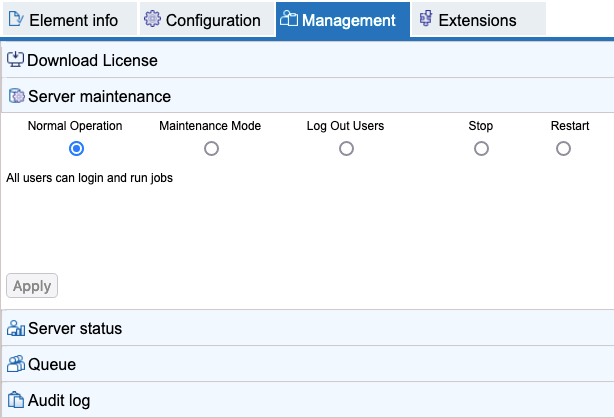
Figure 12.1: Administrative users can control the operating mode of the CLC Server using functionality available under the Server maintenance tab.
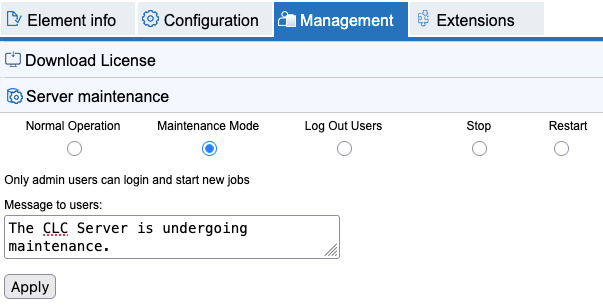
Figure 12.2: Text can be provided for inclusion in messages presented to users already logged into the server, and to those attempting to log in when it is running in maintenance mode.