
Installing the Server software
Installation must be performed by a user with administrative privileges. On some operating systems, you can double click on the installer file icon to begin installation. Depending on your operating system you may be prompted for your password or asked to allow the installation to be performed.
- On Linux, installing to a central location will normally involve running the installation script as an administrative user - either by logging in as one, or by prefacing the command with sudo. Please check that the installation script has executable permissions before executing it.
- On Windows systems, you may need to right click on the installer file icon, and choose to Run as administrator.
If the installer detects that a version of the software is already installed, you will have the option to update the existing installation or to install the CLC Server to a different directory. For standard upgrades, choose to update the existing installation.
If installing for the first time, or if the option to install to a different directory was selected, you will be prompted for the location to install the software to (figure 2.1).
The directory the software is installed into will be referred to as the server installation directory throughout the rest of this manual.
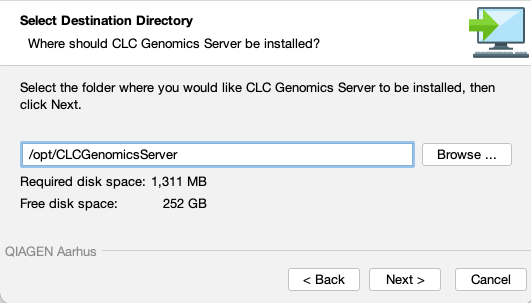
Figure 2.1: The location to install to is prompted for when installing the software the first time, or if the option to install to a different location has been chosen.
The maximum amount of memory the CLC Server Java Virtual Machine (JVM) can make use of can then be adjusted, if desired (figure 2.2). By default, the value is set to 50% of the available RAM on the system you have installed the software on, or 50 Gb, whichever is smallest. If you do not have a specific reason to change this value, leave it at the default setting. Further details about this setting are provided in Setting the amount of memory available for the JVM.
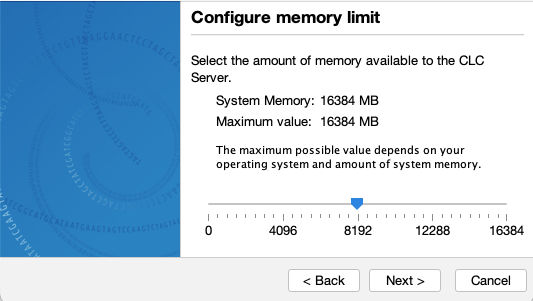
Figure 2.2: Choose the maximum amount of memory to be allocated to the CLC Server Java Virtual Machine (JVM).
System-specific notes
- Linux You will be offered the option to specify a user account that will be used to run the CLC Server process. Having a specific, non-root user for this purpose is generally recommended. On a standard setup, this would have the effect of adding this username to the
systemdservice unit file describing the CLC Server service, and setting the ownership of the files in the installation area to this user. Downstream, the user running the CLC Server process will own files created in File Locations, for example, after data import or data analyses. - Windows You will be offered the choice of starting the service manually or automatically.
- Mac If Rosetta is not present on the system, you will be offered the option of installing it. Rosetta enables Intel-based features to run on Apple Silicon Macs. While not needed for the majority of tools, some require it, for example De Novo Assembly, BLAST, Sample Reads and tools for analyzing small RNA.
Information on stopping and starting the CLC Server service is provided in Starting and stopping the server.
After installation is complete
If licensing has not already been configured for the CLC Server, it will run in "limited mode". License configuration is described in Licensing the CLC Server.After licensing is in place, we recommend that the CLC Server is run in maintenance mode while configuration changes are being made.