
Bug reporting
A bug report can be prepared for the QIAGEN Bioinformatics Support team by clicking the report a bug link in the top right corner of the web client (figure 20.2). To help the Support team troubleshoot the problem, please provide as much detail about the situation as possible in the bug report dialog.
If the server has access to the internet, click Submit Bug Report to send the report to the QIAGEN Bioinformatics Support team. The report will include an archive of the CLC Server logs, configuration information, an excerpt of the audit log, and a text file containing the diagnostic report generated by the check setup tool. Information from job nodes in a job node setup will be included if the Include comprehensive job node info checkbox under the Advanced section is checked.
If the server does not have access to the internet, click Download Bug Report to create and download a zip file containing the bug report archive, which can be attached to an email to ts-bioinformatics@qiagen.com sent from a machine connected to the network.
The process of gathering the information for the bug report can take some time, especially for job node setups.
If a CLC Workbench user experiences a server-related error and submits a bug report from the Workbench error dialog, a server bug report archive will be generated and included with the information submitted to the Support team.
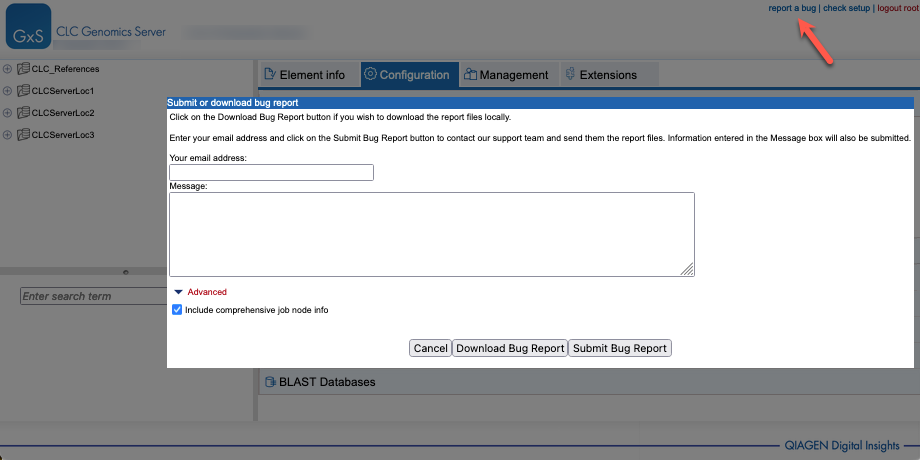
Figure 20.2: Submitting a bug report.
All data sent to the QIAGEN Bioinformatics Support team is treated confidentially. No password information is included in bug reports submitted via CLC software.