
Server plugins
You can install plugins on the server under the Admin ( ) tab (see figure 3.7).
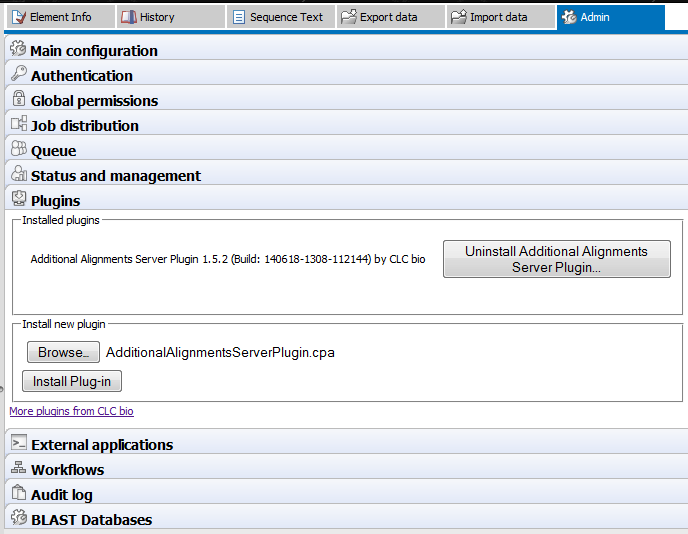
Figure 3.7: Installing and uninstalling server plugins.
Click the Browse button and locate the plugin .cpa file to install a plugin. To uninstall a plugin, simply click the button next to the plugin. Read more about developing Server plugins at http://www.clcdeveloper.com/.
Installing a plugin will require the Server to be restarted. A restart will cause any running or scheduled jobs to fail, so you will be prompted to enter maintenance mode before the plugin installation/uninstallation starts (see section 3.12). You can also enter maintenance mode manually later by using the Status and management panel in the Admin tab (see figure 3.8). In both cases you can write a warning message that will inform users about the expected period of time in which the server will be in maintenance mode. Once all current jobs have been completed, the Server and any job nodes can be restarted.
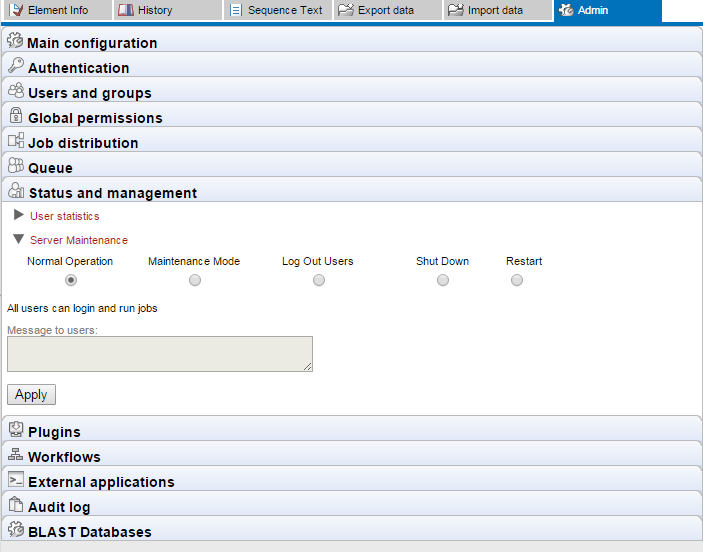
Figure 3.8: The Status and Management dialog.