
Installing Velvet
To get started, you need to do the following:- Install Velvet on the server computer (download from https://github.com/dzerbino/velvet/tree/master). Note that if you have job nodes, it needs to be installed on all nodes that will be configured to run Velvet. We assume that Velvet is installed in
/usr/local/velvetbut you can just update the paths if it is placed elsewhere. - Download the scripts and configuration files made by CLC bio from http://www.clcbio.com/external-applications/velvet.zip
- Unzip the file and place the
clcbiofolder and contents in the Velvet installation directory (this is the script tying the two Velvet program together). You need to edit the script if you did not place the Velvet binary files in/usr/local/velvet. - Make sure execute permissions are set on the script and the executable files in the Velvet installation directory. Note that the user executing the files will be the user who started the Server process (if you are using the default start-up script, this will be root).
- Use the
velvet.xmlfile as a new configuration on the server: Log into the server via the web interface and go to the External applications ( ) tab under Admin (
 ) and click Import Configuration.
When the configuration has been imported, click the CLC bio Velvet header and you should see a configuration as shown in figure 8.15.
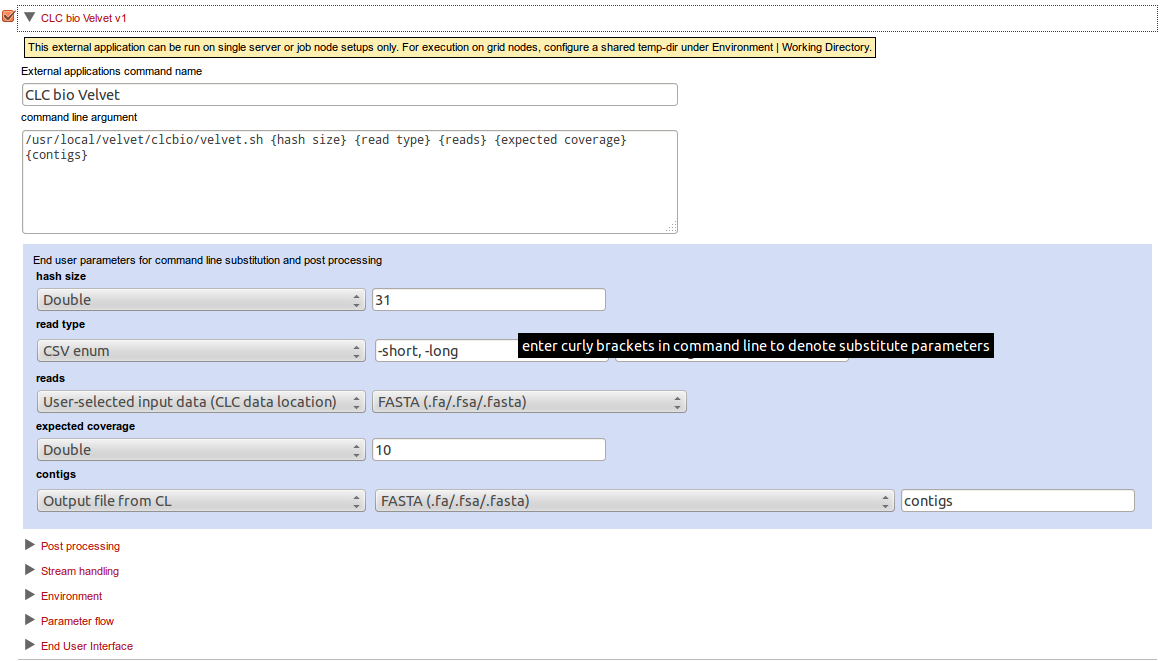
Figure 8.15: The Velvet configuration has been imported.
Update the path to the Velvet installation at the very top if necessary.