
Side Panel settings
The settings in the Side Panel are a subset of the settings in the normal sequence view described in Sequence view. However, there are two additional groups of settings unique to the secondary structure 2D view: Secondary structure.
- Follow structure selection. This setting pertains to
the connection between the structures in the secondary structure
table (
 ). If this option is
checked, the structure displayed in the secondary structure 2D view
will follow the structure selections made in this table. See
Secondary structure
table for more information.
). If this option is
checked, the structure displayed in the secondary structure 2D view
will follow the structure selections made in this table. See
Secondary structure
table for more information.
- Layout strategy. Specify the strategy used for the
layout of the structure. In addition to these strategies, you can
also modify the layout manually as explained in the next section.
- Auto. The layout is adjusted to minimize overlapping structure elements [Han et al., 1999]. This is the default setting (see figure 26.10).
- Proportional. Arc lengths are proportional to the number of residues (see figure 26.11). Nothing is done to prevent overlap.
- Even spread. Stems are spread evenly around loops as shown in figure 26.12.
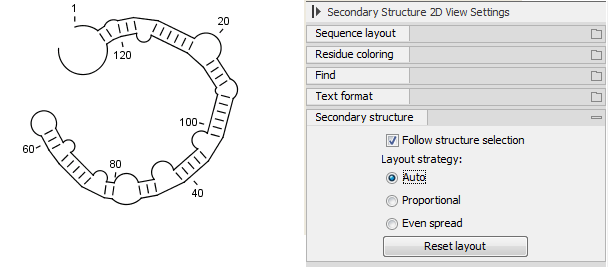
Figure 26.10: Auto layout. Overlaps are minimized.
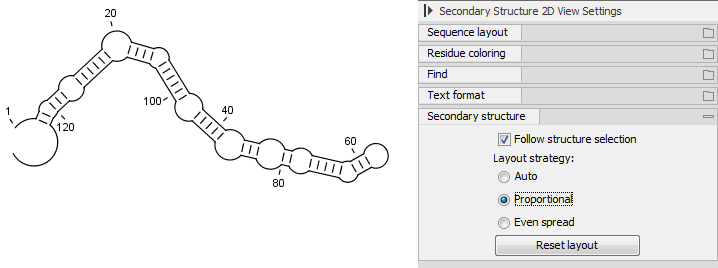
Figure 26.11: Proportional layout. Length of the arc is proportional to the number of residues in the arc.
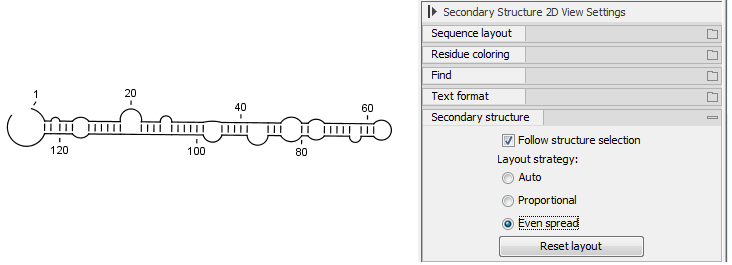
Figure 26.12: Even spread. Stems are spread evenly around loops.