
Installing the TRANSFAC plugin and files
Download and install the TRANSFAC files on your computer
Once you have a subscription to the flat file release download of TRANSFAC, you can download the match.zip file from: https://portal.genexplain.com/download/transfac/
Decompress the zip file and place the extracted folder somewhere on your machine. Remember where you extracted the folder as you need to configure the Workbench preferences later on with this location. Please do not change the relative location or names of the files within this folder.
Installation of the TRANSFAC plugin
TRANSFAC plugin is installed using the plugin manager. In order to install plugins, the workbench must be run with administrator privileges.
Help in the Menu Bar | Plugins... ( )
)
or Plugins () in the Toolbar
The plugin manager has two tabs at the top:
- Manage Plugins. This is an overview of plugins that are installed.
- Download Plugins. This is an overview of available plugins.
Install the plugin by clicking the Download Plugins tab and browsing for the plugin called "TRANSFAC".
When you close the dialog, you will be asked whether you wish to restart CLC Workbench. The plugin will not be ready for use before you have restarted the workbench.
Note that you may wish to click on the button labeled "No" and restart the Workbench yourself. If you choose "Yes", the workbench restarts using the administrator privileges you were using so that you could install the plugin.
Configuring the Workbench Preferences
Open up the Workbench Preferences by going to:Edit | Preferences | Advanced | TRANSFAC Preferences
In this panel, click the Select Location button and select the Match folder within the downloaded TRANSFAC files. The Workbench will warn you if the files do not exist in this folder.
If you have a local installation of TRANSFAC available via a web interface, you can specify an alternative base-url pointing to your local installation.
If you do not have a local installation, just leave this at the default setting at
https://portal.genexplain.com/cgi-bin/build_t/idb/1.0/get.cgi?.
In case your geneXplain online subscription is not restricted to TRANSFAC (build_t), but also includes other geneXplain databases (e.g. build_ghptywl), please replace the build_t in the default base-url by build_ghptywl (or as appropriate to your subscription).
The preferences panel is shown in figure 2.1
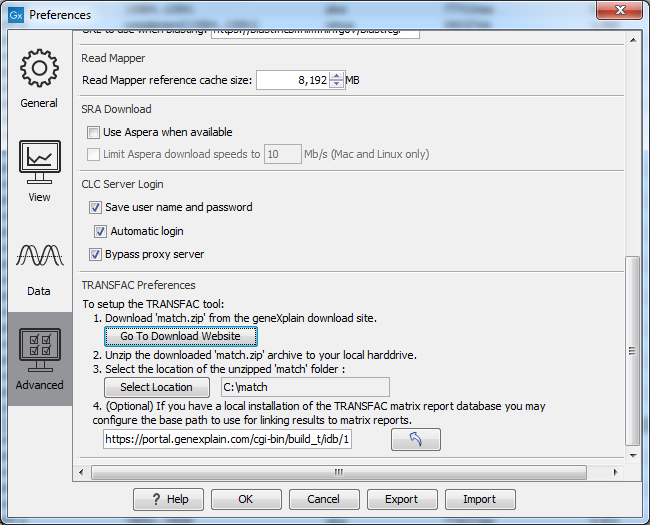
Figure 2.1: Pointing the Workbench to the data files downloaded from the geneXplain web site.